
Compare a symbol across exchanges
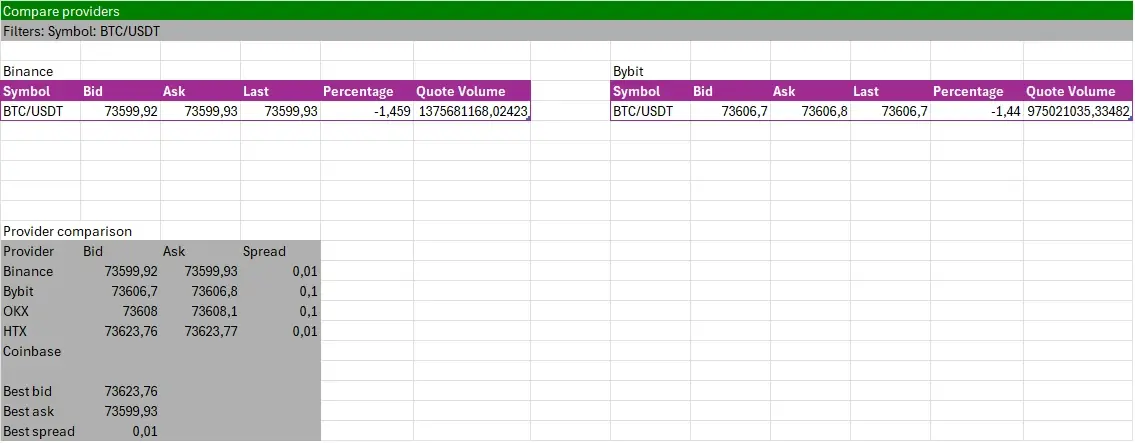
Overview: the "Compare providers" dashboard puts one symbol's bid, ask and spread on Binance, Bybit, OKX, HTX and Coinbase side by side in one sheet. It reads public market data: no API key and no exchange account are needed.
Preview:
Build it:
- In Excel's ribbon, LinkyFlow tab → "Dashboard".
- In "Compare providers", type the symbol (for example BTC/USDT).
- Optionally choose an "Auto-refresh" interval under Options, then click "Build".
What the sheet holds:
- One table per exchange (Get Ticker 24h): bid, ask, last price, 24-hour change and quote volume.
- Provider comparison: each exchange's bid, ask and spread, then the best bid (the highest), the best ask (the lowest) and the best spread (the narrowest).
Notes:
- An exchange that returns no price for the symbol stays blank, and the best values come from the others.
- "Refresh" in the ribbon reads every price again.
- A worked arbitrage example, fees included: How to leverage price discrepancies across crypto exchanges.