
 Shopify
 WooCommerce
 eBay
eBay BigCommerce
Inventory Stock Sync Agent
The LinkyFlow Inventory Stock Sync Agent keeps the stock quantities of one or more target stores in step with one master store, SKU by SKU, every hour. Depending on the mode you choose, it reports each difference, proposes the change, or sets the target quantity and reads it back to confirm it. It works with Shopify, WooCommerce, eBay and BigCommerce.
Sign in or create your LinkyFlow account, then set this agent up.
How the workflow works
What this agent does
Master
- Reads the stock quantity of every SKU
- The source of truth — never written
- Target quantity = master − safety stock
Compare
- Matches items by exact SKU only
- Compares with what each target holds
- Reports missing or ambiguous SKUs
Targets
- Monitor mode: reports the difference
- Approval mode: proposes the change
- Auto mode: sets the quantity, then reads it back
Examples
What the agent returns in real situations
1. Already in sync
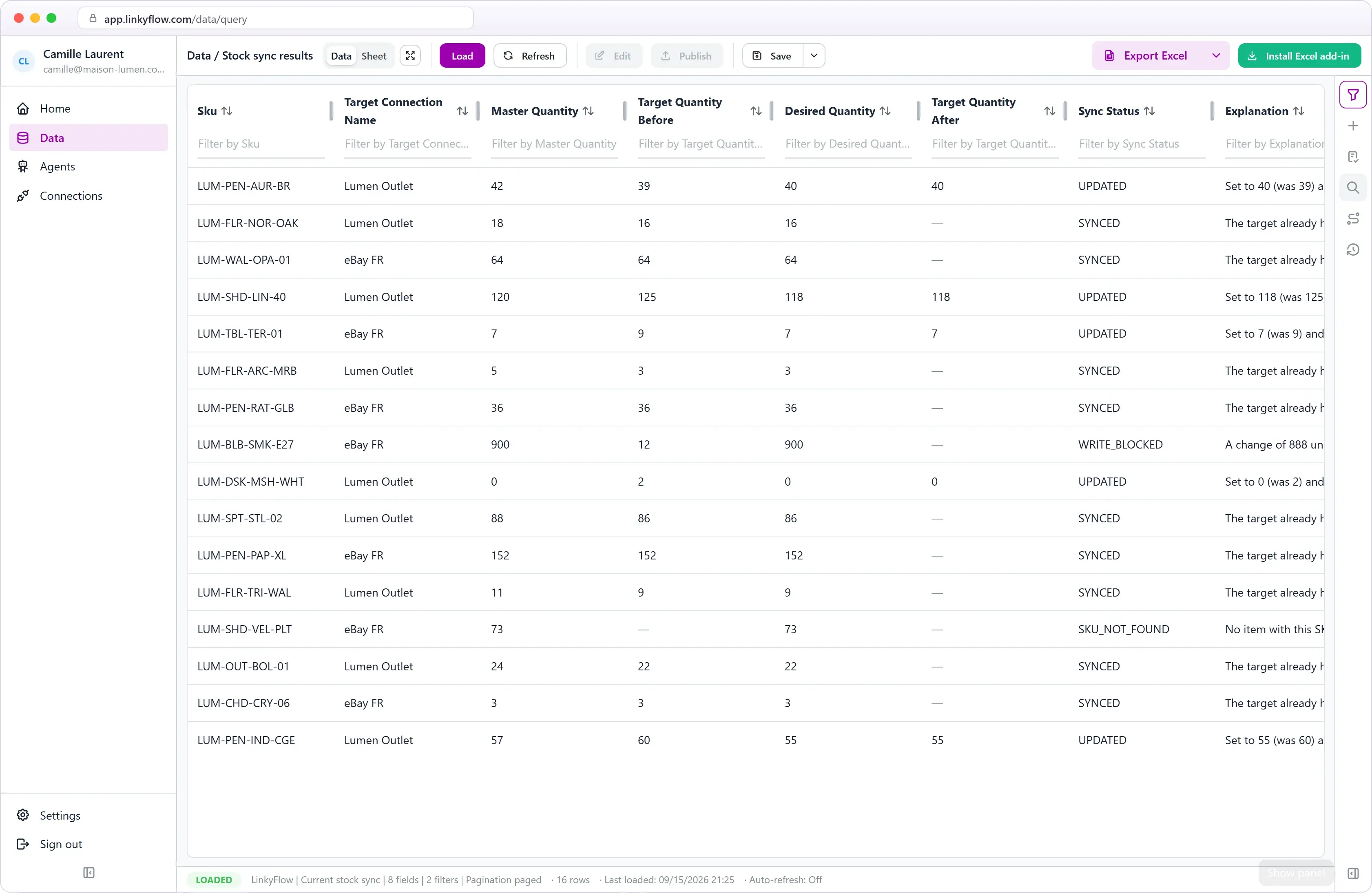
SYNCED
- Master
- 24 units
- Target
- 24 units
- Action
- No write
Nothing to do: the target already holds the desired quantity.
2. Target out of sync, in Auto mode
UPDATED
- Master
- 24 units
- Target
- 17 → 24 units
- Action
- Set to 24, read back 24
Counted as updated only because the quantity read back is the one written. In Monitor mode the same SKU is reported as OUT_OF_SYNC, and nothing is written.
3. SKU missing on a target
SKU_NOT_FOUND
- Master
- SKU TS-BLK-M · 12 units
- Target
- No item with this SKU
- Action
- No write
Reported as a case. Nothing is matched by title and nothing is guessed.
Every possible result
| Result | What it means |
|---|---|
| SYNCED | The target already holds the desired quantity. Nothing to do. |
| OUT_OF_SYNC | The target differs and the agent is in Monitor mode: reported, not written. |
| UPDATE_PROPOSED | The target differs and the agent is in Approval mode: the change is recorded as a proposal, waiting for you. Nothing is written. |
| UPDATED | The quantity was written, read back, and the quantity read back is the one that was wanted. |
| WRITE_BLOCKED | A guard-rail refused the write. The case says which one. |
| WRITE_FAILED | The store refused the write, or the agent could not read the item back to confirm it. Nothing is assumed about a change it could not see. |
| WRITE_MISMATCH | The store accepted the write and the quantity read back afterwards is not the one written — most often a sale landed in between. It is re-evaluated on the next run. |
| SKU_NOT_FOUND | The master SKU exists on no stockable item of the target. |
| SKU_AMBIGUOUS | The SKU names more than one item on the master or on the target. It is never guessed. |
| LOCATION_NOT_FOUND | The item is not stocked at the configured location. Activate it there first. |
| INVALID_MASTER_QUANTITY | The master quantity cannot be read: the master does not track stock for this SKU, reports no number, or does not stock it at the master location. |
| NOT_TRACKED | The target does not track stock for this item. The agent never switches tracking on for you. |
What you can do with the results
From result to action
Review exceptions
See the SKUs that could not be matched, the writes that were blocked or failed and the targets that still differ — with both quantities and the reason.
Open in Excel
Review the current stock sync, open exceptions, runs and the detail of a past run in a live workbook.
Run again now
Start a sync on demand after fixing a SKU or activating a location.
Ask an assistant
Ask ChatGPT or Claude which SKUs are out of sync or why a write was blocked — and approve or reject proposed changes in Approval mode.
Controlled write behaviour
The only thing this agent can change is a stock quantity at a target store — in Auto mode, or when you approve a proposal. The master is read and never written. Every write is a set, never an adjustment: it passes guard-rails first and is read back before it counts as updated. Products, prices, titles, listings and orders are never touched, and every agent starts in Monitor mode, which writes nothing.
Capabilities
- Writes stock quantities only
- Runs every hour
- Runs on demand
- Approval mode before writing
- Every write read back
- Live Excel workbook views
- ChatGPT and Claude, via MCP
What is the Inventory Stock Sync Agent?
Selling the same products on a Shopify store, a WooCommerce site, a BigCommerce store and eBay means keeping several stock counts in step by hand — and the day one of them drifts, you oversell. The Inventory Stock Sync Agent takes one store as the truth, keeps the others at its quantities every hour, and tells you about every SKU it could not settle.
You choose a master store and one or more target stores. For every SKU of the master, the agent works out the quantity each target should hold, compares it with what the target actually holds, and — depending on the mode — reports the difference, records the change it would make, or sets the target quantity and reads it back to confirm it.
The rule is deliberately simple:
target quantity = master quantity − safety stock (never below zero)
The safety stock is a number of units kept back per target, zero by default. There is no rules engine, no percentage split and no per-channel allocation: this agent replicates one authoritative stock, and that is all it does.
What it is, and what it is not
This is not an omnichannel stock engine. The master is the only source of truth. A target never influences the master, and two targets never influence each other. If a target sells on its own, its stock diverges from the master until the next run — the agent then sets it back to the master's quantity; it does not subtract the sale from the master.
If your warehouse system, your ERP or one of your stores is where stock is actually managed, make that store the master. If no single place holds the truth, this agent is not the right tool yet.
Which stores are supported?
The master and the targets can each be:
- Shopify — stock is read and set at one location you choose.
- WooCommerce — simple products, and the variations of variable products that manage their own stock.
- eBay — the inventory items of your seller account, by SKU.
- BigCommerce — the units on hand at one location you choose, read and set through BigCommerce's Inventory API. A write sets the variant's absolute stock level at that location (Set Stock Level), never an adjustment. The connection needs the Products (read-only), Store inventory (modify for the agent to write, read-only for Monitor mode) and Store locations (read-only) scopes.
The same provider can be used for the master and a target (two Shopify stores, say), and two targets can be of the same provider — or two locations of one Shopify or BigCommerce store. A store cannot be its own target at the same location, and the same destination cannot be listed twice.
Two agents that write cannot target the same stock, and two writers cannot each target the other's master: the second configuration is refused, naming the first. An agent in Monitor mode writes nothing, so any number of them can watch the same stores.
Three modes
| Mode | What happens with a difference | Writes to the stores? |
|---|---|---|
| Monitor | It is reported as OUT_OF_SYNC. | Never. |
| Approval | The change the agent would make is recorded as UPDATE_PROPOSED, with both quantities and the quantity it would write. | Only a change you approve. |
| Auto | The target quantity is set, then read back. Only when the quantity read back is the one wanted is the SKU counted as UPDATED. | Yes — the target's stock quantity, and nothing else. |
Every agent starts in Monitor. Switching to Auto is the one setting that lets the agent change something at a store on its own, and the screen says so in red where you make that choice.
Matching is by SKU, exactly
A master SKU is matched to a target item by exact SKU and nothing else. There is no matching by title, no "close enough", and no AI anywhere in the process. When the match is not clean the agent reports it and never guesses:
- a SKU the target does not carry is SKU_NOT_FOUND;
- a SKU that names two items on one side is SKU_AMBIGUOUS — nothing is written until the catalogue is fixed;
- a product without a SKU on the master is counted and skipped;
- a WooCommerce variable product is not stockable itself: its stock lives on its variations, which are matched by their own SKUs;
- on BigCommerce, only tracked items are synced: a product without options tracked at product level, or the variants of a product tracked per variant. An untracked item, or a variant of a product with options tracked at product level — its variants share one count — is reported and never written;
- an archived or trashed product is not for sale and is skipped;
- a target item that does not track stock is NOT_TRACKED — the agent never switches tracking on for you.
Locations
A Shopify store with several locations holding stock, or a BigCommerce store with several locations, must be told which one the agent reads or writes. The agent never sums locations and never picks one for you: until you choose, it waits in "setup required" and says so. A store with a single location needs no choice.
Guard-rails
A wrong master reading — a connection pointed at the wrong store, a location that was just emptied, an import that zeroed a catalogue — would otherwise be replicated to every target within the hour. So every automatic write passes through guard-rails, and each one turns the write into a WRITE_BLOCKED case instead of performing it:
| Guard-rail | Default | What it refuses |
|---|---|---|
| Max change per SKU (units) | 500 | A single write that would move one SKU by more than this many units. |
| Max change per SKU (%) | 300 % | A single write that would change a SKU by more than this share of its current target stock. Not applied when the target is at zero. |
| Max share of the catalogue changed per run | 25 % | The circuit breaker, per target store: when more than this share of the SKUs that were in sync at the previous run suddenly need a correction, every write to that store in the run is refused. |
| Allow zero propagation | on | Whether a master at zero may set a target to zero. A sold-out master is usually the most important thing to replicate; switch it off if your master's zero readings are not trustworthy. |
| Master reading max age | 30 minutes | How old the master reading may be when a target is written from it. An older one is read again first. |
The defaults are conservative on purpose, and you can change them per agent.
Concurrency, honestly
A sale can land on a target between the moment the agent reads it and the moment it writes. On Shopify the write carries the quantity that was read, and Shopify refuses it if the level moved in between. WooCommerce, eBay and BigCommerce offer no such check: the write goes through and the read-back catches the difference as WRITE_MISMATCH. The window is a few hundred milliseconds. If a target sells at high volume, prefer Approval mode, or accept that a mismatch is re-evaluated an hour later.
How does the agent run?
- Automatically, once per hour. The whole catalogue is compared each time; nothing is assumed from a previous run.
- On demand too, from the agent's page or from ChatGPT.
- Not in real time. There is no webhook: a sale at 10:05 is replicated during the 11:00 run.
A run reads up to 100,000 stockable items per connection by default. A larger catalogue is reported as truncated rather than partly synced in silence, and a run that reaches its time budget stops cleanly and lets the next run finish.
Exceptions are cases, not alerts
Every result other than SYNCED and UPDATED is a case about one SKU at one target. The same difference seen every hour is one case with a count; when a later run finds the target back in step — because it was written, or because you fixed it by hand — the case closes itself and says so.
Each case carries the SKU, both stores, the target's location when it has one, both quantities, the quantity the agent wanted, the action, the result and the reason in a sentence: enough to understand it without opening either store.
Approving proposed changes
In Approval mode every difference becomes a proposal. You approve or reject each one from ChatGPT or through the API, one at a time or up to 25 at once, and get one answer per proposal.
An approval is for the exact change you were shown. Before writing, the agent reads the master and the target again, recomputes the quantity with your current safety stock and re-applies the guard-rails. If a stock moved in between, nothing is written: the proposal is marked stale and a fresh one replaces it. Approving the same proposal twice writes nothing the second time, and a rejection holds in every mode until the master or the target stock moves.
What a run did, later
What one run decided — every SKU, both quantities, the quantity wanted, the quantity read back after a write, the result and the reason — is kept as that run's own record for 30 days, and does not change afterwards. After 30 days the record says so, rather than showing an empty list.
Reviewing results in Excel and on the web
The agent's page shows where every SKU stands and what each run did. Four live views are available, in the web workspace and as a connected Excel workbook:
- Current stock sync — one row per SKU and target: master and target quantities, the desired quantity, the quantity read back after a write, the action, the result and the reason.
- Open exceptions — the cases that need you.
- Runs — one row per run: SKUs checked, in sync, updated, proposed, blocked and failed.
- Historical run detail — the rows of one specific run, kept for 30 days.
Asking ChatGPT or Claude
With LinkyFlow connected to ChatGPT, Claude or any MCP client:
Set up my stock sync: master "EU boutique", target "Outlet" with a safety stock of 2, in monitor mode.
Run my stock sync now.
Which SKUs are out of sync?
Show me the blocked writes and why.
Switch my stock sync to auto mode.
The last one is a real change at your target stores, and the assistant tells you so before it is made.
Current limitations
- One master, one or more targets, one direction. It replicates an authoritative stock. It does not merge sales from several channels and does not subtract a target's sales from the master.
- Exact SKU only. No matching by title, barcode or similarity.
- One location per connection. Locations are never summed.
- The only write is a stock quantity. Products, prices, titles, listings and orders are never touched.
- Hourly, with no webhook.
- Approving and rejecting proposals is done from ChatGPT or the API for now, not from buttons on the agent's page.
- Detailed run data is kept for 30 days. Run summaries and the current sync stay.
Next steps
Frequently asked questions
Does the agent write to my stores?
Only in Auto mode, or when you approve a proposal in Approval mode — and only a stock quantity at a target store. The master store is never written. Monitor mode, where every agent starts, writes nothing at all.
Which stores can be the master or a target?
Shopify (stock read and set at one location you choose), WooCommerce (simple products and the variations that manage their own stock), eBay (the inventory items of your seller account, by SKU) and BigCommerce (the units on hand at one location you choose, for the products and variants that track stock). The same provider can be used on both sides.
How are products matched between stores?
By exact SKU and nothing else. There is no matching by title or similarity and no AI: a SKU missing on a target, or shared by two items, is reported and never guessed.
What stops a wrong master reading from being copied everywhere?
Guard-rails checked before every automatic write: a maximum change per SKU (500 units or 300 % by default), a circuit breaker when more than 25 % of a synced catalogue suddenly needs a correction, a maximum age for the master reading, and an option to stop a master at zero from zeroing the targets. A refused write becomes a WRITE_BLOCKED case.
Can I review changes before they are written?
Yes. In Approval mode every difference becomes a proposal that you approve or reject from ChatGPT or through the API. Before writing an approved change, the agent reads both stores again and re-applies the guard-rails.
How often does the stock sync run?
Automatically once per hour, and on demand. The whole catalogue is compared on every run, and there is no webhook: a sale made at 10:05 is replicated during the 11:00 run.
Related agents
- Shopify
 Stripe
Shopify + Stripe Reconciliation Agent
Matches every Shopify transaction paid through Stripe with the real Stripe payment, fee and net amount — and flags what does not reconcile.
- Missing Stripe payments
- Amount and currency mismatches
- Refunds not recorded in Shopify
Launch this agent
Add it to your LinkyFlow account in a few steps. It starts running as soon as its setup is complete.