
How to leverage price discrepancies across crypto exchanges for arbitrage
Hi there!
In the fast-paced world of cryptocurrency trading, the same coin rarely costs exactly the same on every exchange. Those gaps can be arbitrage opportunities, but only if you see them in time and they are larger than what the trade costs. Today we build, in one Excel sheet, a live comparison of one symbol across five exchanges with LinkyFlow, then check a real gap against the fees.
Understanding Arbitrage in Cryptocurrency Trading
Arbitrage means buying an asset on the platform where it is cheaper and selling it on another where it is dearer, keeping the difference. In crypto markets, where prices can drift apart between exchanges, such gaps appear often; most of them are smaller than the fees, and the others close quickly.
Build the comparison in Excel
LinkyFlow is an Excel add-in, free on the Microsoft Marketplace. The comparison reads public market data: no API key and no account on the exchanges are needed.
Step 1: Open the dashboards
In Excel's ribbon, the LinkyFlow tab has a "Dashboard" button: it opens the ready-made dashboards.
Step 2: Choose the symbol and build
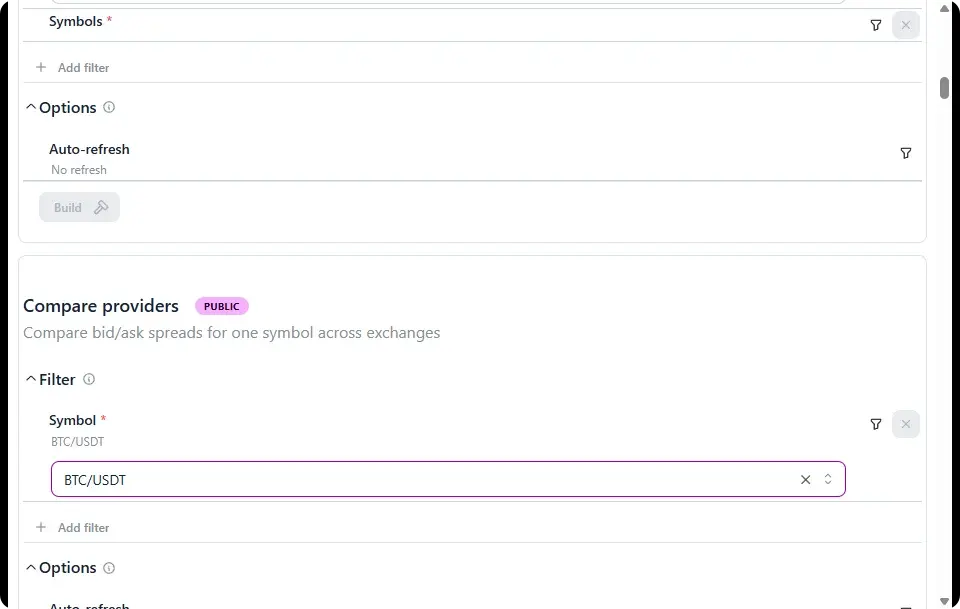
In "Compare providers", type the symbol to compare, here BTC/USDT, then click "Build". The "Auto-refresh" option, under Options, reads the prices again on its own at the interval you choose.
Step 3: Read the comparison
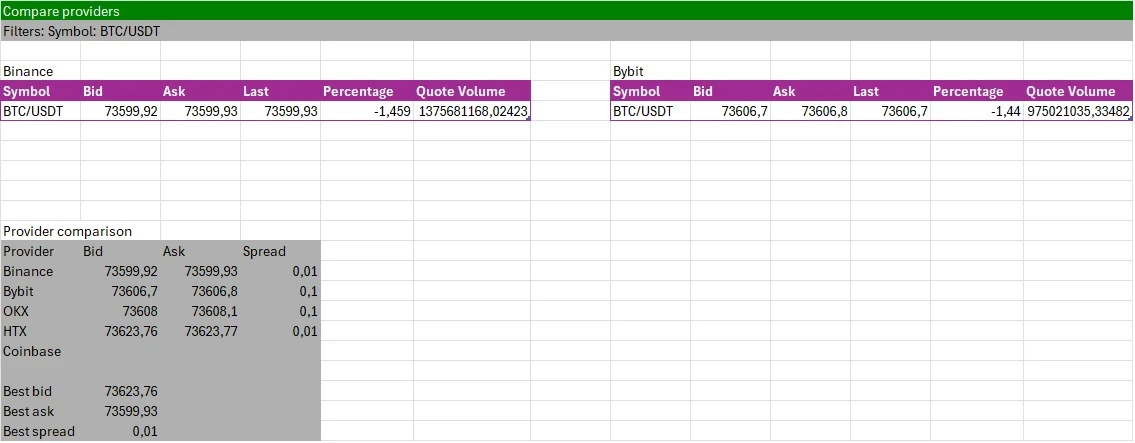
LinkyFlow creates a "Providers" sheet with one table per exchange (Binance, Bybit, OKX, HTX and Coinbase): bid, ask, last price, the 24-hour change and the quote volume. Below, "Provider comparison" puts each exchange's bid, ask and spread side by side, then the best bid (the highest, where you would sell), the best ask (the lowest, where you would buy) and the best spread.
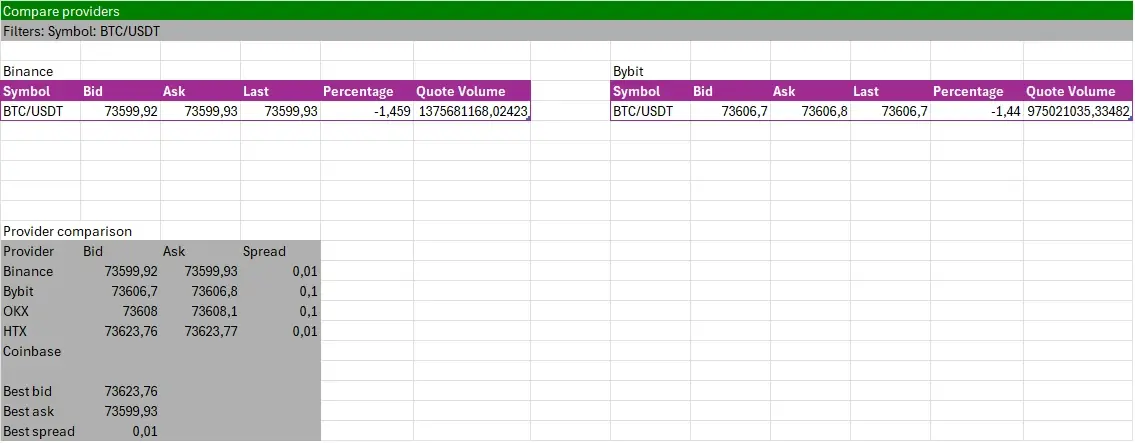
An exchange that returns no price for the symbol stays blank (Coinbase in this capture), and the best values are taken from the others. "Refresh" in the ribbon reads every price again.
Taking Advantage of Price Discrepancies
With the data in front of you, here is how to judge a gap:
- Identify the opportunity: compare the best ask (where you buy) with the best bid on another exchange (where you sell).
- Calculate the potential profit: the best bid minus the best ask, then subtract the trading fees on both exchanges, and the withdrawal fee and delay if the coins have to move from one exchange to the other.
- Execute the trade: buy on the exchange with the lower ask and sell on the one with the higher bid, both quickly, before the gap closes.
- Monitor and repeat: keep the sheet refreshed and watch for the next gap.
A real example, from the capture
- Best ask: 73,599.93 USDT on Binance
- Best bid: 73,623.76 USDT on HTX
The gap is 73,623.76 - 73,599.93 = 23.83 USDT per bitcoin, about 0.03%. With a trading fee of 0.1% on each side, buying and selling one bitcoin costs about 147 USDT (73.60 + 73.62): this gap would lose money. That is the usual case, and the reason to compute it in a sheet before acting: the gap has to be wider than every fee added together.
Tips for Successful Arbitrage Trading
- Count every fee: trading fees on both sides, withdrawal fees, and the network fee of the transfer.
- Keep funds on both sides: moving coins between exchanges takes minutes or hours, often longer than the gap lasts.
- Manage risks: crypto trading is risky; only commit what you can afford to lose.
- Watch liquidity: the best bid and ask only hold for the quantity offered at that price; a large order moves the price against you.
- Be quick: other traders see the same gaps, and they close fast.
Conclusion
Comparing one symbol across Binance, Bybit, OKX, HTX and Coinbase takes one dashboard and one click in Excel with LinkyFlow, and the sheet tells you right away whether a gap is wider than the fees. To read your own Binance balances and trades in Excel as well, see How to display your Binance balances & trades directly in Excel. How an order is previewed, placed and checked, step by step: Buy bitcoin on Binance end to end.
Happy trading!