
Exchange API permissions
You now have an API key, so let's review the permissions and what they mean.
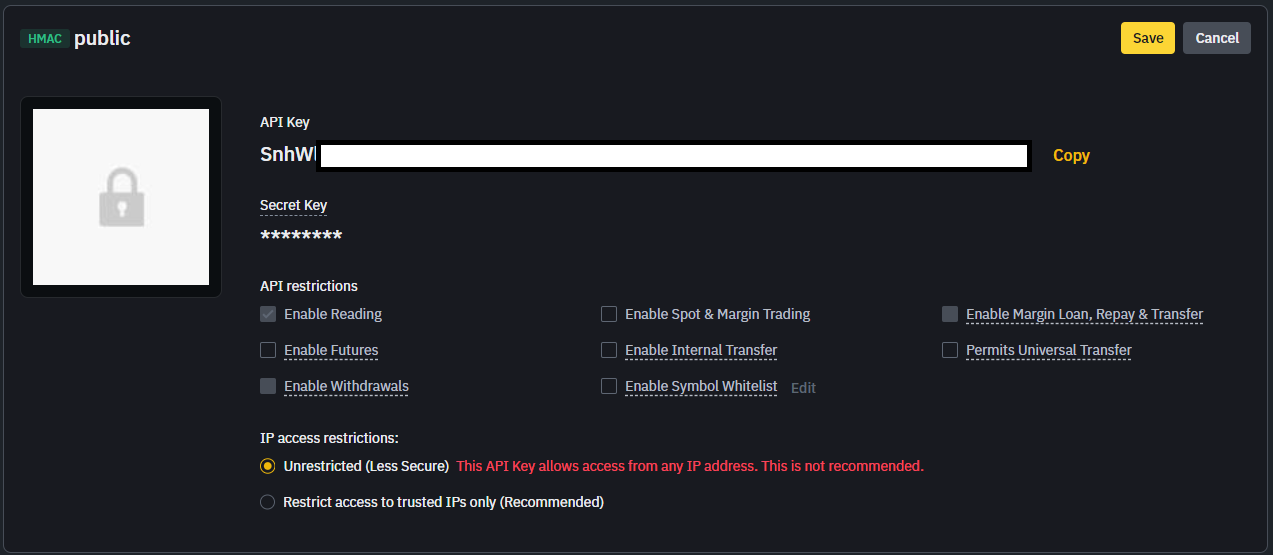
API restrictions
- Enable Reading: Required to access account data. - Enable Spot & Margin Trading: Needed only if you want to place orders from Excel. - Enable Futures: Required only for futures trading. - Enable Withdrawals: Not required for LinkyFlow. Keep disabled for safety. - Enable Internal Transfer / Universal Transfer / Symbol Whitelist: Optional advanced settings.
IP access restrictions
- Unrestricted (less secure): Allows any IP address. - Restrict to trusted IPs (recommended): More secure, but requires a fixed IP. LinkyFlow runs through AWS servers (Frankfurt). If you need a fixed IP for your exchange, contact us and we will help you.
Recommended setup for LinkyFlow
- Enable Reading to access your portfolio and reports. - Enable Spot & Margin Trading only if you want to create orders from Excel. It's fine to start with a read-only key and upgrade later if you need trading.