
Why Shopify sales don't match your Stripe payouts, and how to reconcile them at month end
Shopify counts a sale on the day the order is placed, for what the customer paid. Stripe pays you days later, net of its fees and of the refunds made in the meantime, in payouts that ignore where your month ends. Put October's sales next to the Stripe payouts your bank received in October and the two will not agree, even when nothing is wrong. Most of the gap is timing. The work at month end is to break it into lines you can name, and to find the one or two that are real errors.
This applies to sales paid with the Stripe payment app for Shopify. If your store uses Shopify Payments, Shopify pays you out itself and the same reasoning applies to its own payouts: see Shopify orders and payouts in Excel.
One month, two totals
The example below is an illustrative data set, built for this article: no real store, no real customer. Its assumptions:
- A store selling in euros, every sale paid through the Stripe app into one Stripe account that settles in euros.
- Automatic daily payouts. Here, a day's payments are paid out three days later and reach the bank the same day. Your own delay is in Stripe's payout settings, and each payout's Arrival Date says when it lands.
- The fees are made up for the example; they are not Stripe's prices.
- One sale in US dollars, no dispute this month.
For October, Shopify shows €24,380.00 paid through Stripe on the month's orders. The bank received €23,166.94 in Stripe payouts dated October. The €1,213.06 between them breaks down like this:
| Amount | What it is | |
|---|---|---|
| Paid through Stripe on October orders, per Shopify | €24,380.00 | |
| Payments of 29 to 31 October, paid out on 1 to 3 November | −€2,140.00 | timing |
| Payments of 28 to 30 September, paid out on 1 to 3 October | +€1,915.00 | timing |
| Refunds made in October, €129.00 of them on September order #2104 | −€486.00 | refunds |
| Stripe fees on the payments paid out in October | −€412.37 | fees |
| Order #2188, $120.00: Shopify's conversion to euros against Stripe's | −€0.69 | currency |
| Order #2194, €89.00: no payment on the Stripe account | −€89.00 | to investigate |
| Stripe payouts received in October | €23,166.94 |
The two timing lines cancel out over time: what September pushed into October, October pushes into November. Fees, refunds and the currency difference are real money, explained, and booked as such. One line fits none of these: €89.00 that Shopify says was paid and that never reached Stripe. That is the one to chase.
On 31 October, Stripe still holds €2,103.59 for this store: the €2,140.00 of the last three days, less their €36.41 of fees. That money is not missing. It is the balance waiting for the first payouts of November.
Six records, six dates
A lot of month-end confusion comes from comparing records that do not mean the same thing. Between a customer's click and a line on your bank statement, there are six:
| Record | Where | Its date | Its amount |
|---|---|---|---|
| Order | Shopify | when it was placed | what the customer owes, tax and shipping included |
| Transaction | Shopify | when the payment was processed | one sale, capture or refund, on one gateway |
| Payment (charge) | Stripe | when Stripe took the payment | the gross, in the currency charged |
| Balance transaction | Stripe | created, then Available On | gross, fee and net, in your settlement currency |
| Payout | Stripe | created, then Arrival Date | the sum of the balance transactions it pays out |
| Bank line | your bank | when the bank books it | the payout: one line for many orders |
An order can carry several transactions (an authorization and a later capture, a partial refund), and a payout groups dozens of payments. Comparing order totals with payouts mixes all of that together. What holds is the identifier: Shopify records the Stripe payment's id on the transaction, the Stripe balance transaction names the payment it comes from, and the payout lists its balance transactions.
Where each line of the gap comes from
Dates. Shopify's sales reports put a sale on the day it was made. Stripe makes the money available after a settlement delay that depends on your country, your industry and your account, then pays out what is available. A sale on 30 October can only be in a November payout. Stripe's dates also have a time zone: LinkyFlow shows them in UTC (the Z in 2026-10-31T23:30:00Z), so a sale at half past midnight on 1 November in Paris is still a 31 October payment in UTC. Set both sides' bounds in the same time zone before comparing.
Fees. Stripe takes its fee from each payment before paying out, and the balance transaction shows the gross, the fee and the net. Shopify never sees that fee, so its total is gross while the payout is net. And when you refund a payment, Stripe keeps the fee it took on it.
Refunds. A refund leaves your Stripe balance the day you make it, so it comes out of the next payout, whatever month the order was in. Shopify's sales reports work the same way and show it on the day it was processed. Order #2104 was a September sale; its €129.00 refund belongs to October's payouts. Matched to the order's month instead, it creates a gap in both months.
Payments still pending. At month end, the payments of the last few days sit in your Stripe balance, not yet paid out. That balance is money Stripe owes you, not a difference to explain away, and it should be gone after the first payouts of the next month. If it is not, find out why.
Currencies. When a customer pays in dollars and your account settles in euros, Stripe converts at its own rate, which the balance transaction keeps. The euro figure Shopify holds for the same order comes from Shopify's conversion. The two rarely agree to the cent.
Payments that never went through Stripe. A gift card, PayPal, a manual payment or Shopify Payments are other gateways: they are in Shopify's totals and in no Stripe payout. Filter Shopify on the Stripe gateway before comparing anything. And sometimes a sale is marked as paid through Stripe while the payment is nowhere on your account, often because it went to another Stripe account, or because a live payment was looked up with a test key. That is #2194.
Two more things take money out of a payout and appear nowhere in Shopify's sales: disputes, with their fees, and Stripe fees charged outside a payment. The real payout shown further down has both.
The order of the checks
- Same scope, same calendar. Shopify filtered on the Stripe gateway, both sides cut at the same instant.
- Every payout explained. Break each payout of the month into its lines. With the payout's own line included, they sum to zero; a payout that does not is not fully explained yet.
- Every payment paired with its sale, by identifier. Not by amount and date: two €42.00 payments in the same hour are two candidates, not a match.
- The timing lines dated. Each one has the payout that will clear it. Check that last month's have cleared.
- The Stripe balance rolled forward. If your books keep Stripe as an account of its own, its balance at month end should equal what Stripe still holds:
| Stripe balance, October | Amount |
|---|---|
| Balance on 1 October: the payments of 28 to 30 September, net of €32.56 of fees | €1,882.44 |
| + October payments, in euros as Stripe settled them (€24,380.00 − €89.00 − €0.69) | €24,290.31 |
| − Refunds | −€486.00 |
| − Fees on October's payments (€379.81 paid out in October, €36.41 still pending) | −€416.22 |
| − Payouts | −€23,166.94 |
| Balance on 31 October | €2,103.59 |
Whatever is left after these five checks is not timing. A timing difference has an end date, the payout that carries it. If you cannot name that payout, treat the line as an error and keep it open rather than booking a balancing entry.
Doing it with LinkyFlow, read-only
LinkyFlow reads Shopify and Stripe; it writes nothing at either.
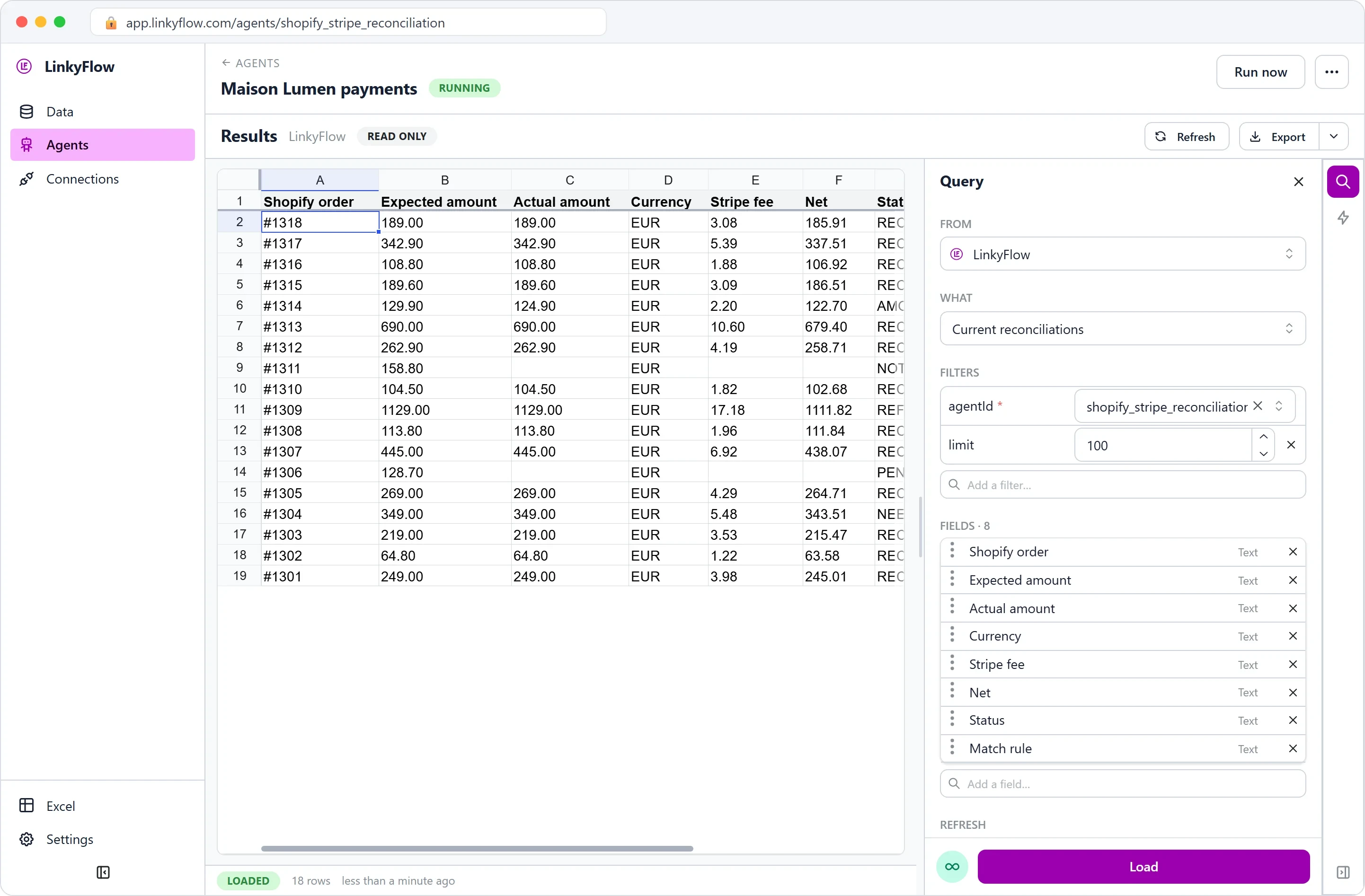
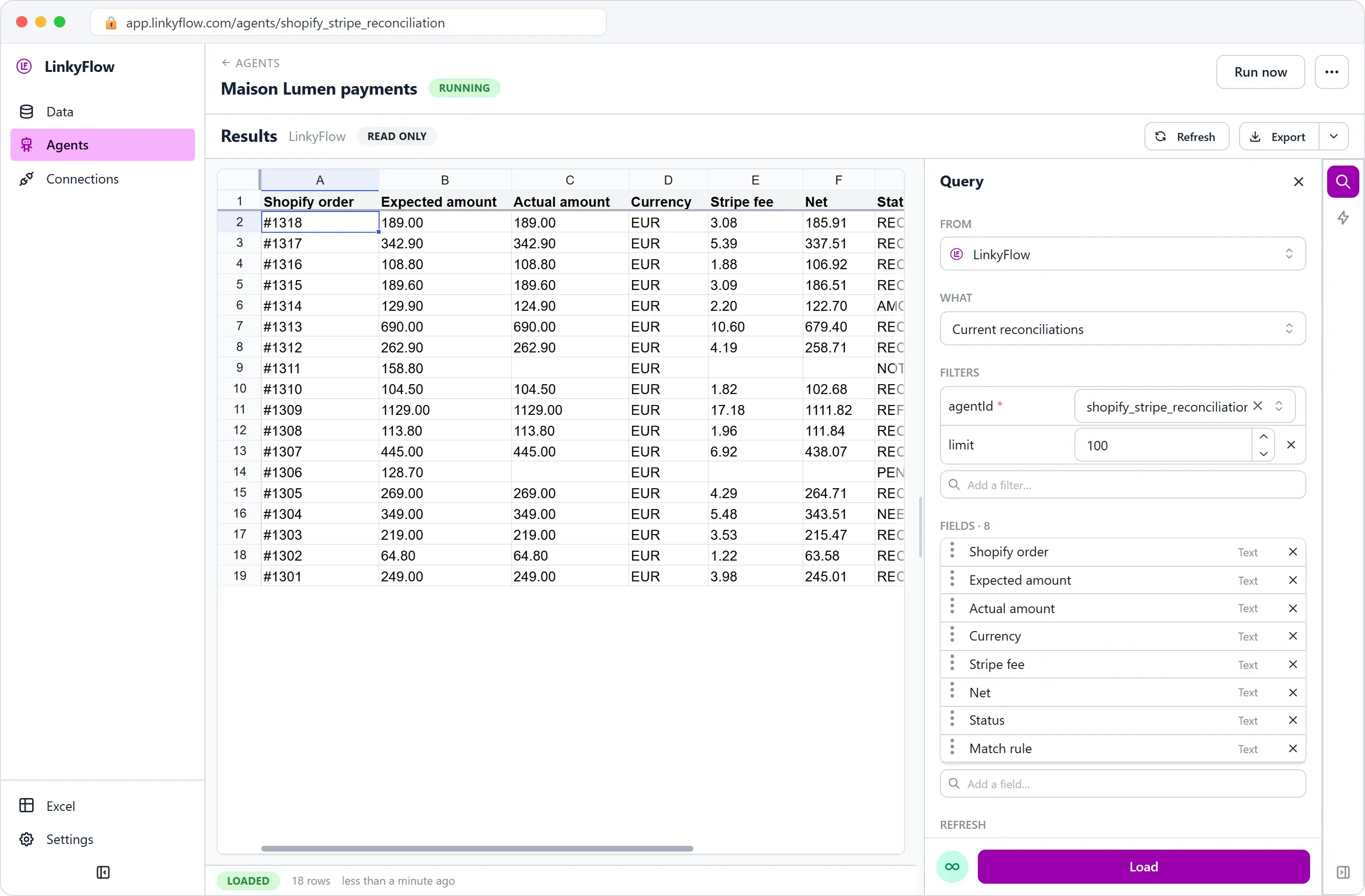
Pair each payment with its sale. The Shopify + Stripe Reconciliation agent runs check 3 every hour. It takes each Shopify transaction paid through Stripe, finds the Stripe payment by the identifier Shopify recorded or by a reference to the order in the payment, checks amount, currency and status, and records the fee and the net. It never pairs on amount and date alone. Its Current reconciliations view shows where each sale stands: a payment not settled yet is PENDING, a sale with no payment NOT_FOUND, a different amount AMOUNT_MISMATCH, a refund made on one side only REFUND_MISMATCH. Setting it up takes a few minutes: Reconcile Shopify with Stripe payments and fees.
Break down a payout. In Excel or the web app, FROM your Stripe account, WHAT Payout Reconciliation, pick the payout, Load; typed in a cell, =LF.stripe.payoutReconciliation loads the same table. It has one row per balance transaction of that payout, with Gross, Fee and Net in cents. Here are two automatic payouts of a Stripe account in test mode connected to LinkyFlow (test data, no real customer), read on 25 November 2026 and summed by type:
| Payout | What it contains | Paid out |
|---|---|---|
| 11 September 2026 | nine payments made on 8 September, €351.07 gross and €13.66 of fees; one refund of €4.44 | €332.97 |
| 5 November 2026 | five payments, €112.50 gross and €4.80 of fees; one refund of €1.00; two disputes, €26.00 withdrawn and €40.00 of dispute fees; a €20.00 Stripe fee for countering a dispute | €20.70 |
Each table also lists the payout's own line, −€332.97 and −€20.70. With it, the Net column sums to zero: that is check 2. The second payout is the one that surprises people, €112.50 charged and €20.70 received, with every cent of the difference on a line of its own.
Join the two. Put the payout's rows next to the agent's Current reconciliations, with Stripe balance transaction ID added as a field, and look up each row's ID in that column. With the payout's IDs in column A, and the agent's view on a sheet named Reconciliations with the Shopify order in column A and the balance transaction ID in column K: =XLOOKUP(A2,Reconciliations!K:K,Reconciliations!A:A,"not paired"). Each payment the agent reconciled finds its Shopify order. The payout's own line, the fees and the disputes find none, as they should.
See what was still pending. Load Balance Transactions created between 29 and 31 October: the lines whose Available On falls in November were still pending on 31 October.
Or ask. With LinkyFlow connected to ChatGPT or Claude, ask "What made up my Stripe payout of 5 November?" or "Which of my Shopify sales still do not reconcile?". The assistant reads through your connection and never sees your Stripe key.
What it does not do
- Only sales paid through the Stripe app. The agent counts and skips Shopify Payments, PayPal, gift cards and manual payments. For Shopify Payments, the Shopify Finance Sync agent keeps its payouts and their movements, with gross, fee and net apart.
- No bank reconciliation, no bookkeeping. LinkyFlow shows what Stripe paid out, not what your bank booked, and writes no accounting entry.
- Nothing written at Shopify or Stripe. No refund, no capture, no order edited.
- Hourly, and matched on proof. The agent runs once an hour and pairs a payment with a sale by an identifier or a reference to the order, never by amount and date alone.
- Automatic payouts only. Stripe lists the lines of a payout only when the payout was automatic; a manual payout cannot be broken down this way.
- 60 days of orders unless your store gave LinkyFlow access to all its orders.
Try it on your own month. Connect Stripe and load the breakdown of your last payout: the Free plan is enough, with one connection. The agent needs both Shopify and Stripe and runs from the Starter plan, which includes one active agent, three connections and a 15-day free trial.
FAQ
Is a gap between Shopify sales and Stripe payouts a mistake? Usually not. At month end most of it is timing: the payments of the last days are paid out next month, and those of last month's last days are paid out in this one. Fees and refunds explain most of the rest. What survives the checks above is worth chasing.
On which date should a sale be booked? That is for your accountant to decide. What matters for the reconciliation is to keep the sale and the cash apart: the sale on its own date, the payout on the day it reaches the bank, and the Stripe balance in between.
Why doesn't Shopify's Total sales match either? Total sales is gross sales minus discounts and reversals (returns, cancellations, edits), plus taxes, duties, shipping and fees, across every gateway, with each reversal on the day it was processed. Start from the transactions paid through Stripe instead.
Go further
- Reconcile Shopify with Stripe payments and fees: setting up the agent, and what each verdict means.
- Stripe payouts, fees and net in Excel: payouts, balance transactions and payout breakdowns, refreshed on a schedule.
- Shopify + Stripe Reconciliation agent: every status and rule.