
Your Shopify store in ChatGPT and Claude: plain questions, live answers, no key in the chat
Add LinkyFlow to ChatGPT or Claude once, and your assistant reads the Shopify store you connected to LinkyFlow — orders, products, stock — and questions the agents that watch it, in the same conversation. You ask "what came in since Monday?" and it reads the store as it is now, not an export from last month. The assistant signs in to LinkyFlow with your consent; your Shopify access stays on LinkyFlow's servers and never enters the chat.
The questions below are examples; what comes back depends on your store.
How it works
LinkyFlow is an MCP server, at https://mcp.linkyflow.com/mcp. MCP is the protocol ChatGPT, Claude and other assistants use to call outside tools. Every LinkyFlow tool calls the same API that Excel and the web app use, as you: no tool names a user, and no tool takes or returns a key.
- Connect your store to LinkyFlow from the Shopify App Store (Install LinkyFlow for Shopify).
- Add LinkyFlow to your assistant: in ChatGPT or in Claude. The assistant sends you to LinkyFlow, which lists the permissions it asks for — "Read your provider data (balances, trades, orders, payments)", for instance — before you click Authorize.
- Ask. The assistant picks the tools and the connection it needs. With two stores connected, name the one you mean.
MCP comes with every LinkyFlow plan, the Free plan included.
What you can ask
| You ask | The tool it calls | What comes back |
|---|---|---|
| "Which orders came in since Monday, and which are not paid yet?" | commerce_list_orders | the orders between two dates, newest first, up to 100 per call: number, date, payment and fulfilment status, customer email, total and currency, payment gateways |
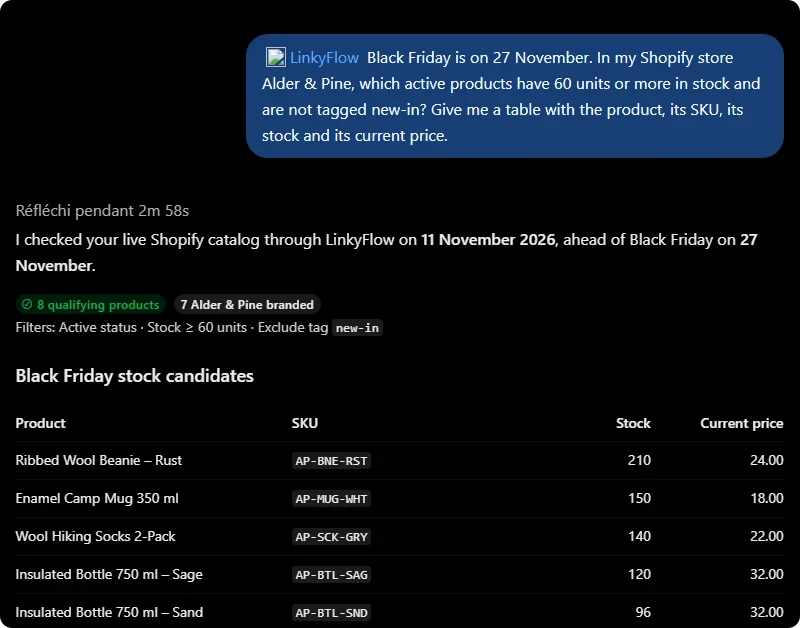
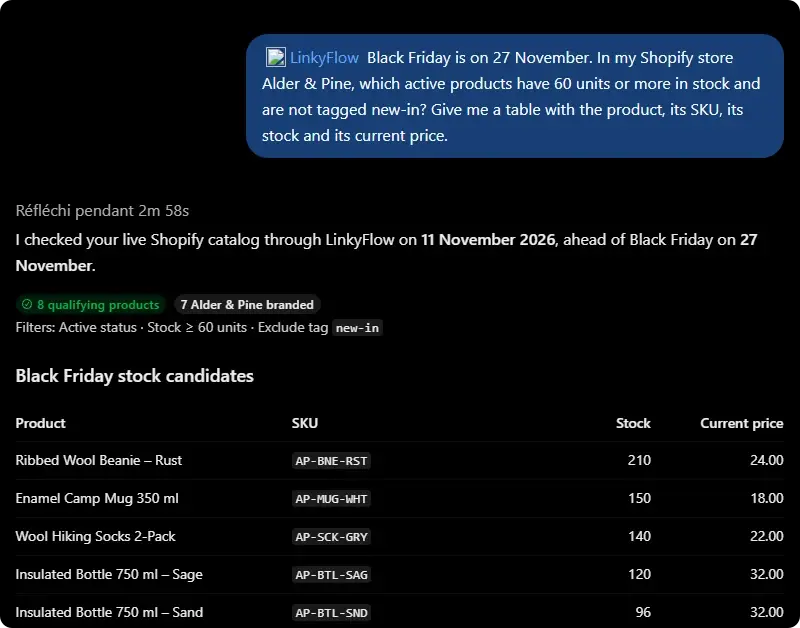
| "Which active products have fewer than 5 units left?" | commerce_list_products | the products with their status, stock quantity, price and currency, sortable by stock, title, creation or update |
| "Which SKUs did the stock sync flag today, and why?" | list_agent_exceptions, get_agent_run_results | the open cases of your agents, and what one run decided, row by row |
| "Approve the stock proposals for TEE-BLK-M." | decide_agent_proposals | up to 25 decisions at once; both stores are read again and the guard-rails applied again before the one write |
| "Is my Shopify connection working?" | check_connection_health | the connection's state, and the fix when it cannot be used |
Two limits are worth knowing:
- 60 days of orders, unless your store gave LinkyFlow access to all its orders — asked at install, and asked of a store installed earlier on its next visit to the app. Asked for older orders without it, LinkyFlow says the answer is incomplete and from which date it can read, rather than passing a short list off as everything.
- A call is a page. A long period takes several calls of up to 100 orders each.
Beyond orders and products
On https://mcp.linkyflow.com/mcp, the assistant also reads your customers and each order's payment attempts (commerce_list_customers, commerce_list_order_transactions), and Shopify's other published tables through two generic tools, provider_find_reads and provider_read: Shopify Payments payouts and balance transactions, discount codes, disputes. A payout read needs your store to have granted LinkyFlow its Shopify Payments access: in the web app, Connections, your store, Additional access, Grant in Shopify.
What the assistant does not do
- It never sees a key. The consent screen says so — "Your provider keys (API keys, secrets, bank access) are never shared. They stay on LinkyFlow." — and no tool has a field that could carry one.
- No money moves on a Shopify order. No Shopify order can be refunded or captured from a chat, and nothing there changes an existing order's contents or its fulfilment. A refund or a capture is confirmed by a person, in LinkyFlow's Actions pane.
- Writing is a permission of its own. Creating, updating or deleting products and setting stock quantities need "Create, update and delete products in your stores", which the consent screen shows when the assistant asks for it. A product deletion is shown to you first and takes a second, confirmed call; a stock quantity is refused by Shopify if the stock moved since it was read.
- The rights you set on a connection apply here too. Untick Read orders on your Shopify connection in LinkyFlow, and the assistant can no longer read them — nor can Excel, the web app, the API or your agents.
A change across many rows, checked line by line, belongs in the sheet: load the table in Excel or the web app, edit, review the list of changes, publish. Plan a Shopify Black Friday with ChatGPT and Excel shows the split: ask the assistant, apply in the sheet.
Reading only, if you prefer
https://mcp.linkyflow.com/mcp/public is LinkyFlow's curated set of tools. It reads, manages your connections and runs your agents, and it moves no money — no order or trade, no refund, no payment, transfer or withdrawal — and the chat writes nothing to a store; your agents keep writing only what their mode allows. Give your assistant that address instead when reading is all you want.
FAQ
Does it work with assistants other than ChatGPT and Claude? Yes: any client that supports remote MCP servers with OAuth uses the same address.
Is the answer up to date? Each question reads the store when you ask it, through your LinkyFlow connection: nothing is copied in advance, so there is no sync to wait for.
Can I set up an agent from the chat? Yes, with the permission to run agents: the assistant adds it switched off, and nothing runs until you ask it to activate it. Agents run on a paid plan; Starter runs one, with a 15-day free trial.
Can it read several stores? Yes, every store you connected to LinkyFlow, one connection each. Name the one you mean when the question could fit several.
Go further
- Add LinkyFlow to ChatGPT and Add LinkyFlow to Claude.
- Inventory Stock Sync agent and Shopify + Stripe Reconciliation agent: what an assistant can ask them.
- LinkyFlow for Shopify: the same store in Excel or on the web.