
Plan Black Friday with ChatGPT, apply it in Excel
ChatGPT is good at questions: which products, how many, what changed, does this look right. A spreadsheet is good at changes: forty prices at once, each one visible before it goes. LinkyFlow connects both to the same Shopify store, so you can ask in ChatGPT and apply in the sheet without exporting anything.
Here is a real conversation, on our demo store Alder & Pine, a little over two weeks before Black Friday. ChatGPT reads the live store through the LinkyFlow plugin; the prices are changed in the LinkyFlow sheet; ChatGPT checks the result. Nothing below was staged: the screenshots are the answers ChatGPT gave.
Before: add LinkyFlow to ChatGPT
LinkyFlow is a plugin in ChatGPT (an MCP server): a few fields to fill once, then you sign in to LinkyFlow and allow the access. The steps are in Add LinkyFlow to ChatGPT. In a conversation, choose LinkyFlow from the + menu of the message box.
1. Ask which products to put on sale
The question, in plain words:
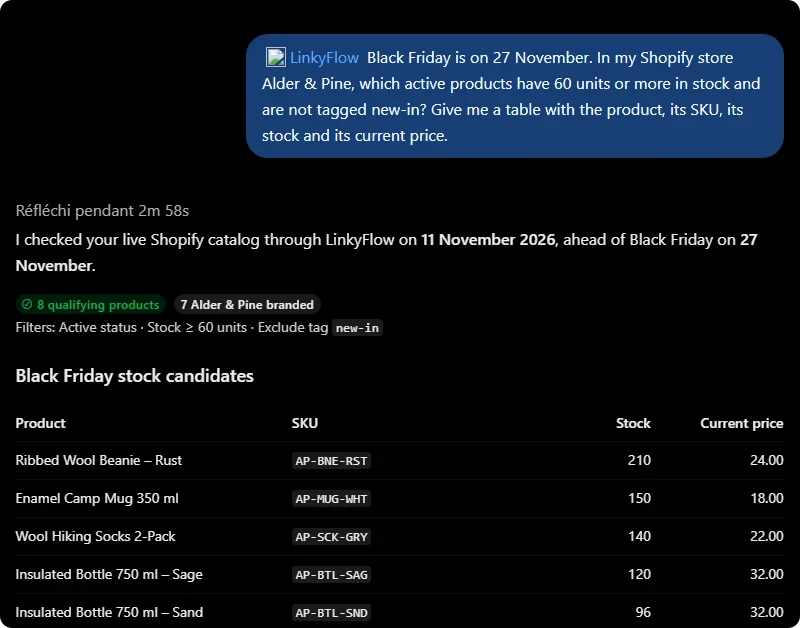
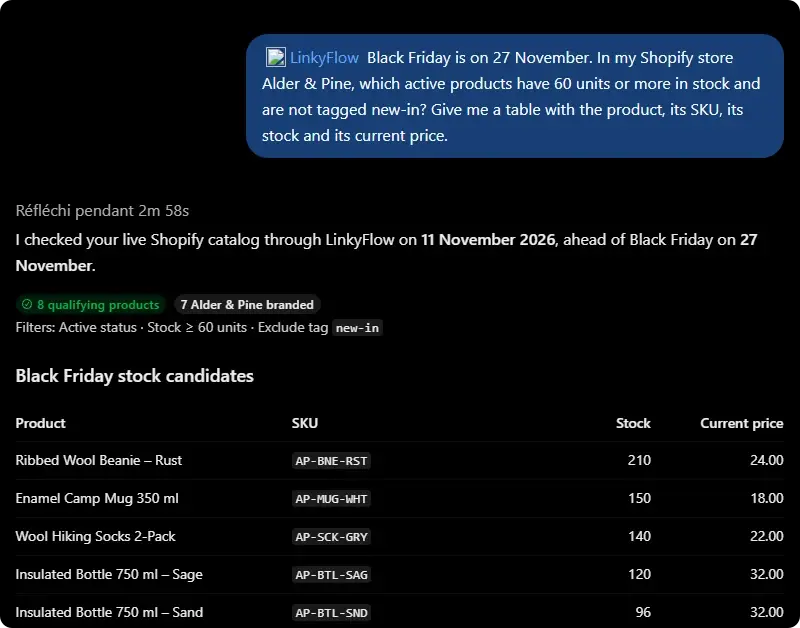
Black Friday is on 27 November. In my Shopify store Alder & Pine, which active products have 60 units or more in stock and are not tagged new-in? Give me a table with the product, its SKU, its stock and its current price.
ChatGPT reads the catalog through LinkyFlow, applies the three conditions and answers with a table.
It also says what it left out and why: a new arrival with 75 units (tagged new-in), an archived product, and a product from another vendor it would review separately. Then a recommendation: focus on the seven Alder & Pine products, the beanie, the mug and the socks first.
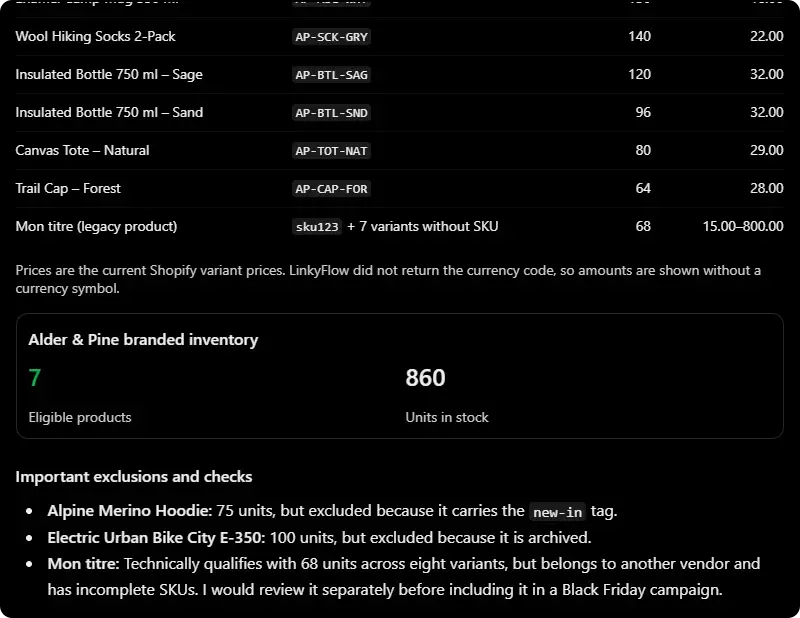
"No prices, tags or inventory quantities were changed": this step only reads.
2. Ask for the sale prices, ready to paste
Good. For the seven Alder & Pine products only, draft a 25% Black Friday sale price, rounded to two decimals. Give me a table with SKU, compare-at price (today's price) and sale price, in that order, so I can paste it into my LinkyFlow sheet in Excel.
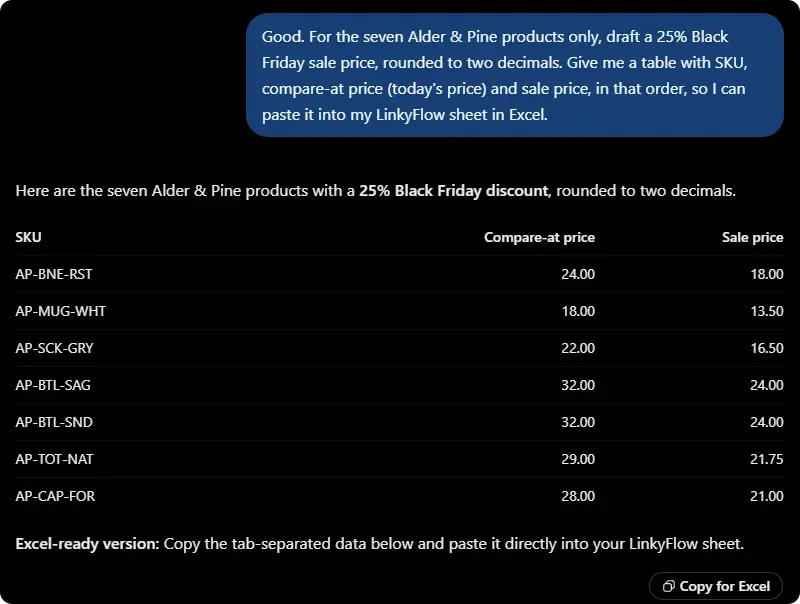
It adds a tab-separated version with a Copy for Excel button: what a sheet takes in one paste.
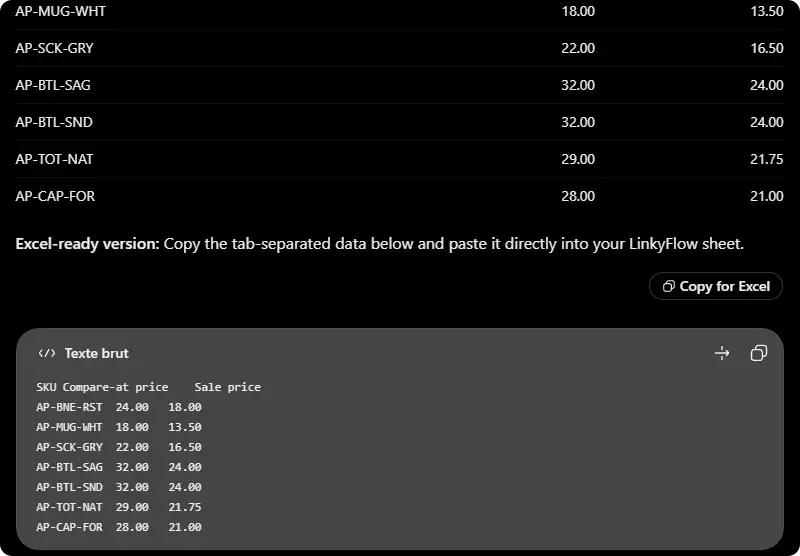
3. Apply the prices in the sheet
This is where the spreadsheet takes over, and for a good reason: fourteen prices are about to change on a live store, and you want to see each one before it goes.
In the LinkyFlow sheet (Excel or the web app), load the Product Variant query filtered on the campaign's products, with SKU, Price and Compare At Price. Click Edit, paste ChatGPT's compare-at prices into Compare At Price and its sale prices into Price. Each change is listed by product, the old value struck through; Publish sends them to Shopify.
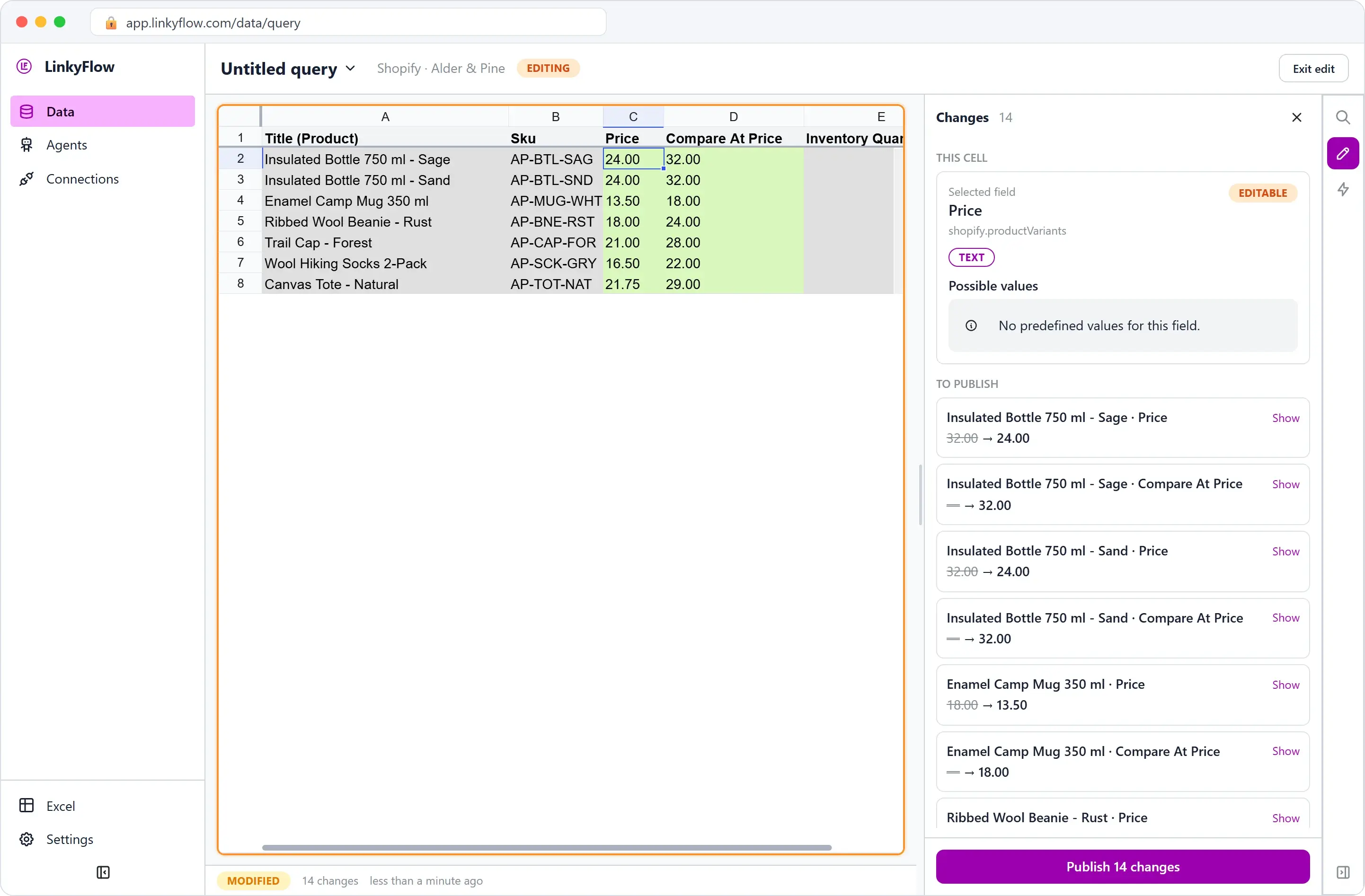
The whole campaign done this way (tag, prices, discount code, and putting everything back after Cyber Monday) is in Black Friday on Shopify: prepare the whole sale in one sheet.
4. Ask ChatGPT to check the discount code
A new conversation, for a last check before launch:
Last check before Black Friday on my Shopify store Alder & Pine: is the BLACKFRIDAY discount set up? Tell me what it gives, from when to when, and its conditions.
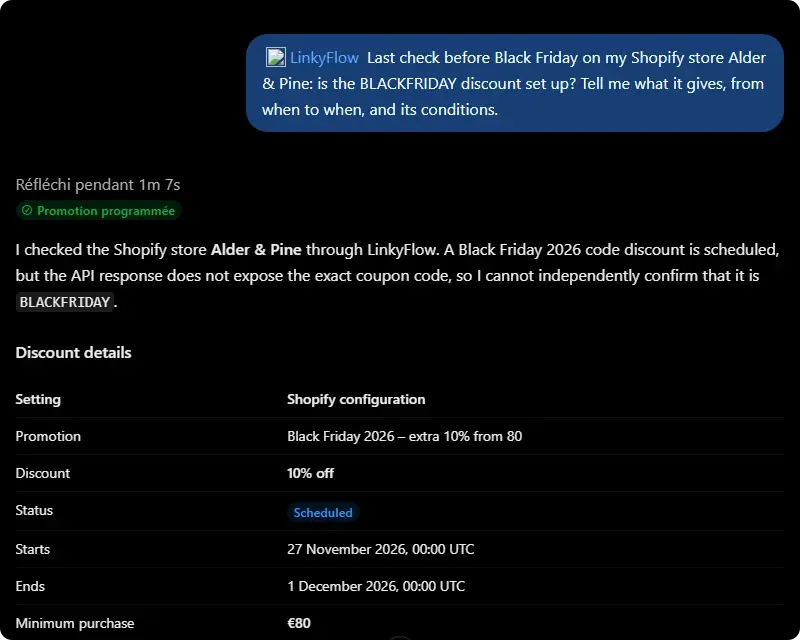
ChatGPT reads the discount back from Shopify: 10 % off, a minimum purchase of €80, one-time purchases, once per customer, scheduled from 27 November to 1 December, not used yet. It converts the dates to Paris time and ends with a checklist.
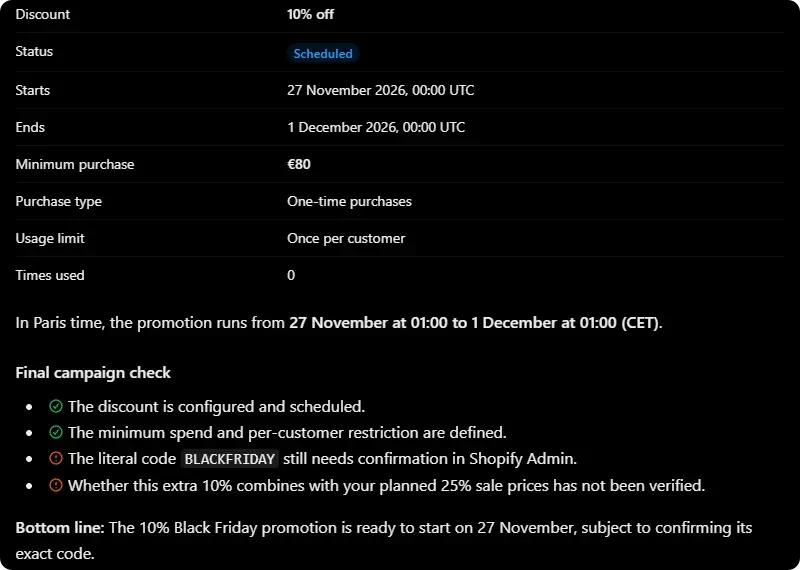
Two of its checks are still open, and it says so rather than guessing. LinkyFlow did not return the code's exact spelling at the time, so it asked you to confirm BLACKFRIDAY in Shopify; since 11 November it does, with how many codes the discount has, and the currency of every price. And whether the extra 10 % adds up with the sale prices has not been checked: in Shopify, a compare-at price is a price, not a discount, so the code does come on top (25 % then 10 % is 32.5 % off).
Who does what
| You want to… | Use |
|---|---|
| ask a question, compare, find what is wrong | ChatGPT, with the LinkyFlow plugin |
| draft numbers to apply | ChatGPT, then paste into the sheet |
| change many rows and see each change before it goes | the LinkyFlow sheet in Excel or the web app |
| keep figures that refresh next to your own formulas | Excel |
What ChatGPT can reach
ChatGPT goes through your LinkyFlow account, with the access you allowed when you added the plugin: it never sees your Shopify password or a token. It reads the stores and accounts you connected in LinkyFlow, and you choose in ChatGPT's plugin settings when it must ask you before using a tool. Changes in bulk stay in the sheet, where you see them.
Start with Add LinkyFlow to ChatGPT, and install LinkyFlow for Shopify if your store is not connected yet.