
Buying bitcoin end to end, every step checked
Placing a buy order takes one click. What goes around it is what costs money when it is skipped: is the price where you think it is, does the order book hold your size, will Binance accept the quantity, did the order fill, at what price, for how much, and what does the account hold now.
This walkthrough buys bitcoin for 100 USDT on Binance and answers each of those questions with LinkyFlow. It was played on 14 November 2026 on a Binance Spot testnet account — Binance's test exchange: test funds, no real money — and every figure below is what the exchange answered. The screenshots are the LinkyFlow web app; the order itself was placed through LinkyFlow's MCP server, by calling the two tools ChatGPT or Claude call when you ask them to buy.
The plan
- Connect Binance, on its testnet to start.
- Read the price and the order book of BTC/USDT.
- Read the market's rules: the smallest order, the quantity step.
- Read what you can spend.
- Preview the order, then place it.
- Check the order, the trade and the new balance.
1. Connect Binance on its testnet
In the LinkyFlow web app, open Connections, then Add connection and Binance. Use test connection connects to the Binance Spot testnet with built-in test keys: no Binance account and no key to create. Name the connection, here Binance testnet, and click Connect.
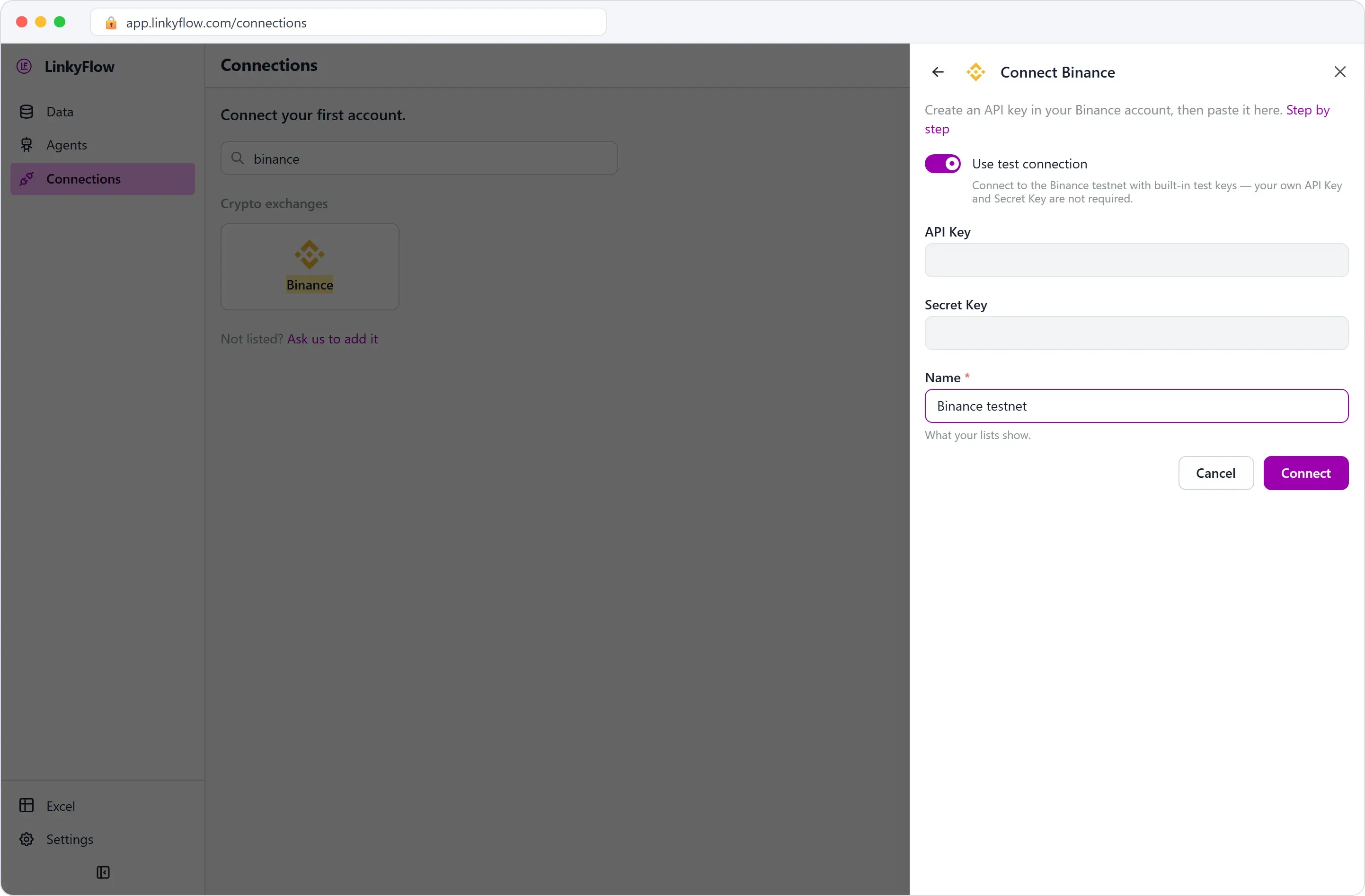
The connection is listed with a TESTNET badge, and every answer it gives carries its environment, testnet. Nothing placed on it spends real money, and the order preview says so too (step 5).
2. The price and the order book
Open Data. FROM is the connection, Binance testnet; WHAT is Get Ticker 24h, with the symbol BTC/USDT; then Load.
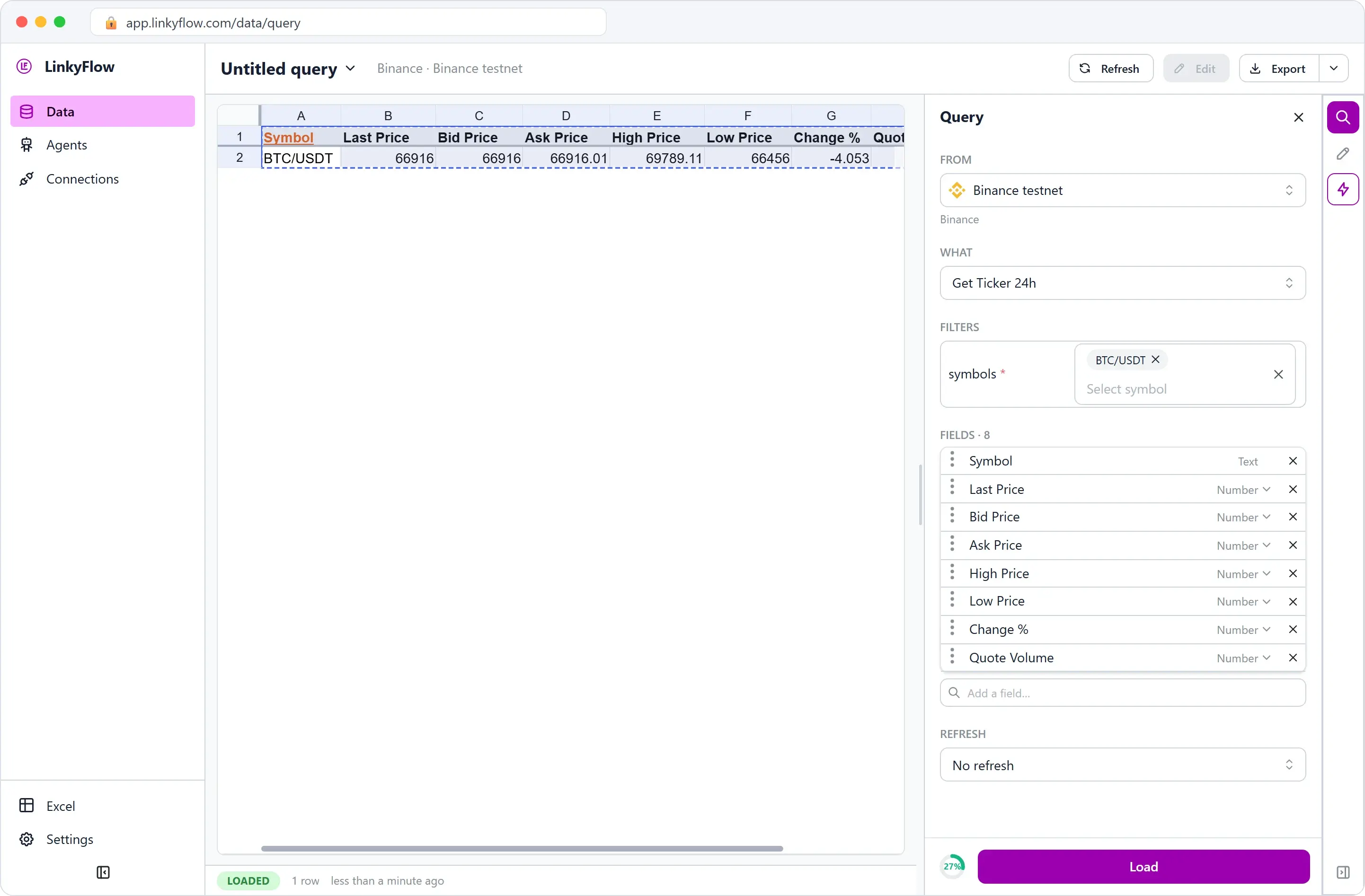
Last price 66,916 USDT, best bid 66,916, best ask 66,916.01, and a 24-hour range from 66,456 to 69,789.11. FROM matters even for public prices: on a testnet connection, LinkyFlow reads the testnet's own market, the one your order will meet.
Then WHAT Get Order Book, depth 5: the five best offers to sell (the asks, cheapest first) and to buy (the bids, highest first).
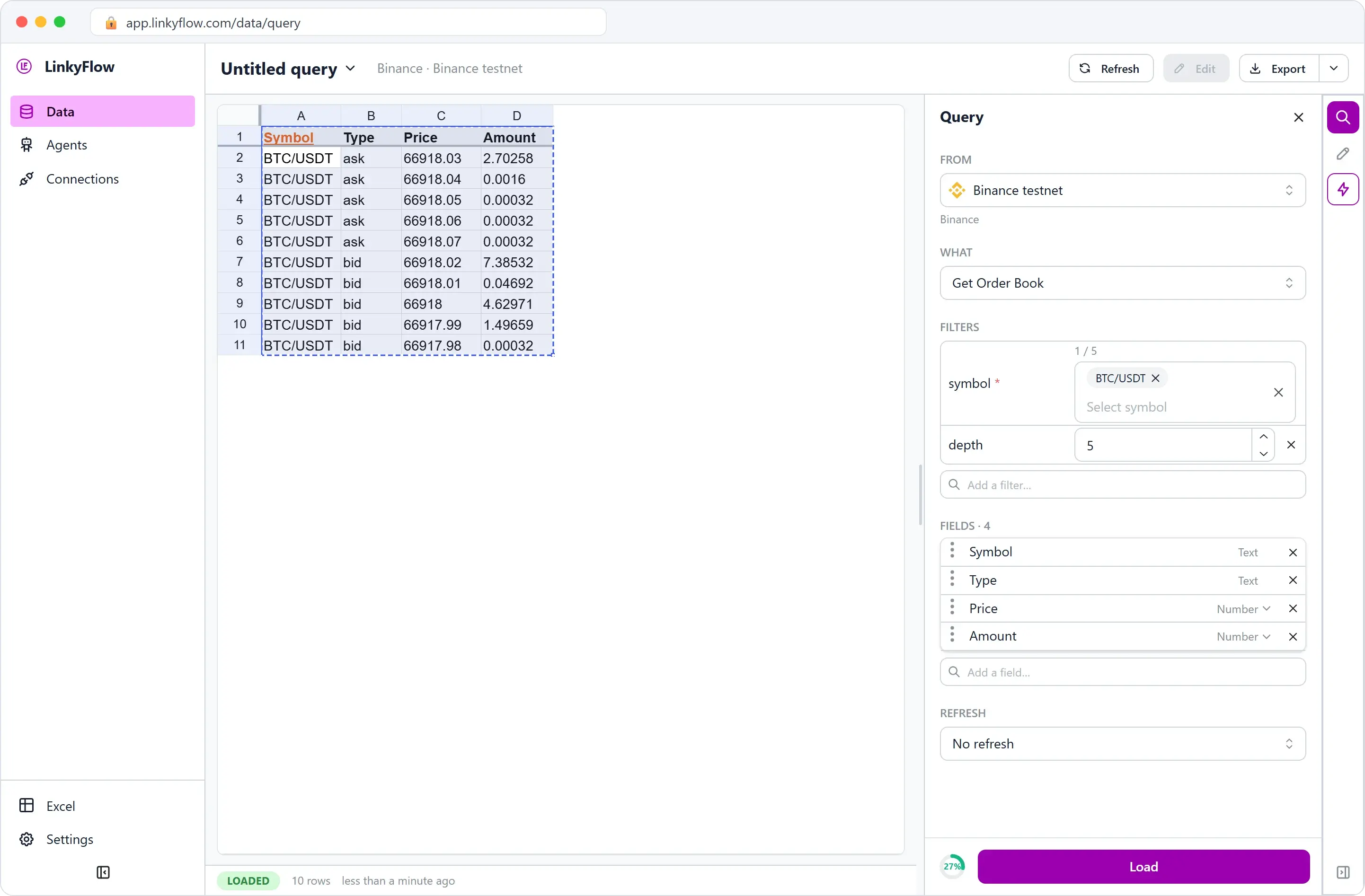
A market buy takes the asks, from the cheapest up. The first one offered 2.70258 BTC at 66,918.03: a 100 USDT order, about 0.0015 BTC, fits in it many times over, so it will not climb the book.
3. The market's rules
WHAT Get Market Metadata, symbol BTC/USDT. It is read from the list of markets LinkyFlow keeps, without a call to the exchange.
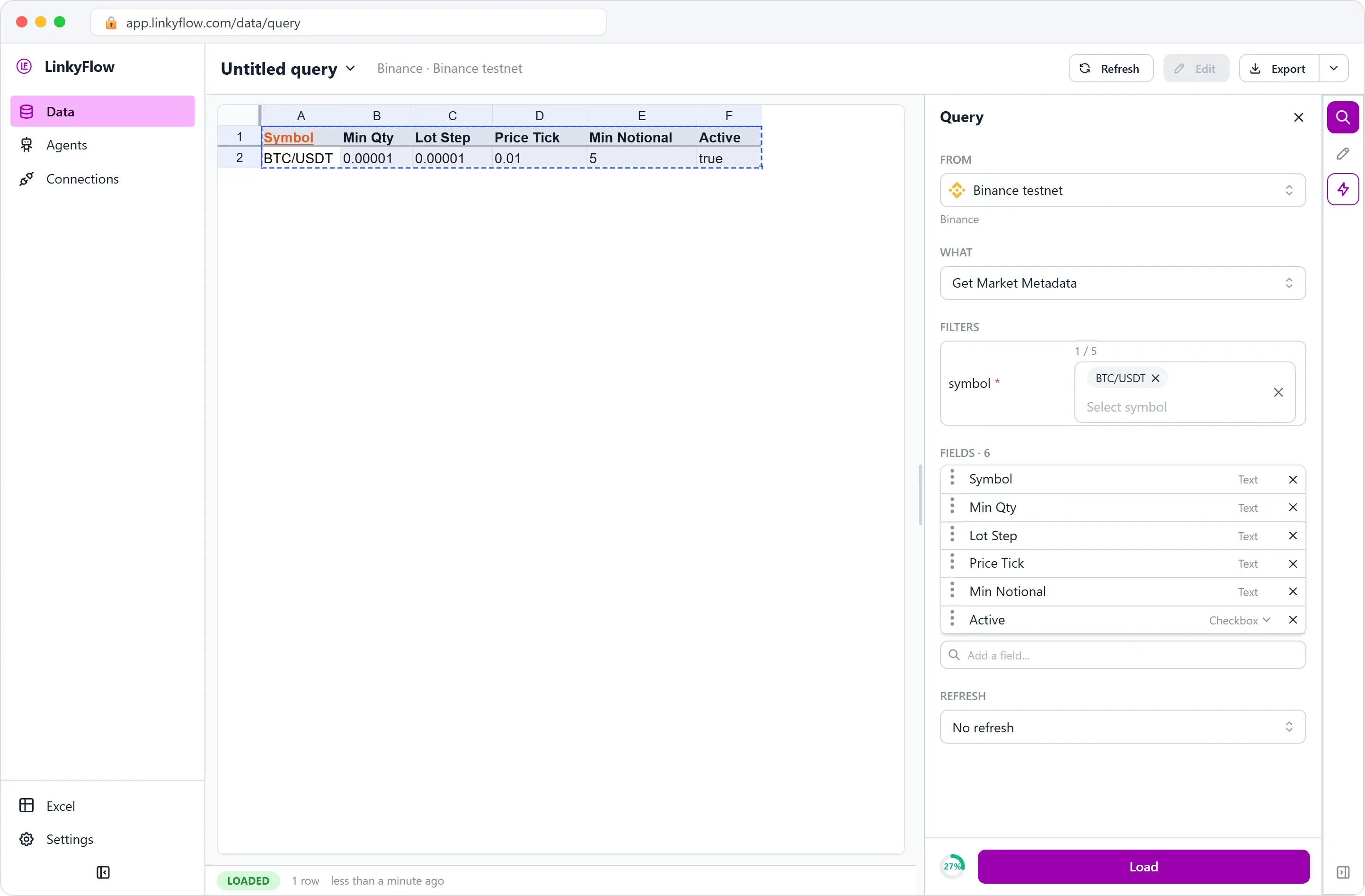
- Min Qty 0.00001 BTC and Lot Step 0.00001: a quantity is a multiple of 0.00001 BTC.
- Price Tick 0.01: a limit price is a multiple of one cent.
- Min Notional 5: an order worth less than 5 USDT is refused.
Binance refuses an order that breaks one of these. LinkyFlow checks them before sending, rounds a quantity or a price down to its step, and the preview of step 5 reports them.
4. What you can spend
WHAT Get My Balances, with the filter assets set to USDT.
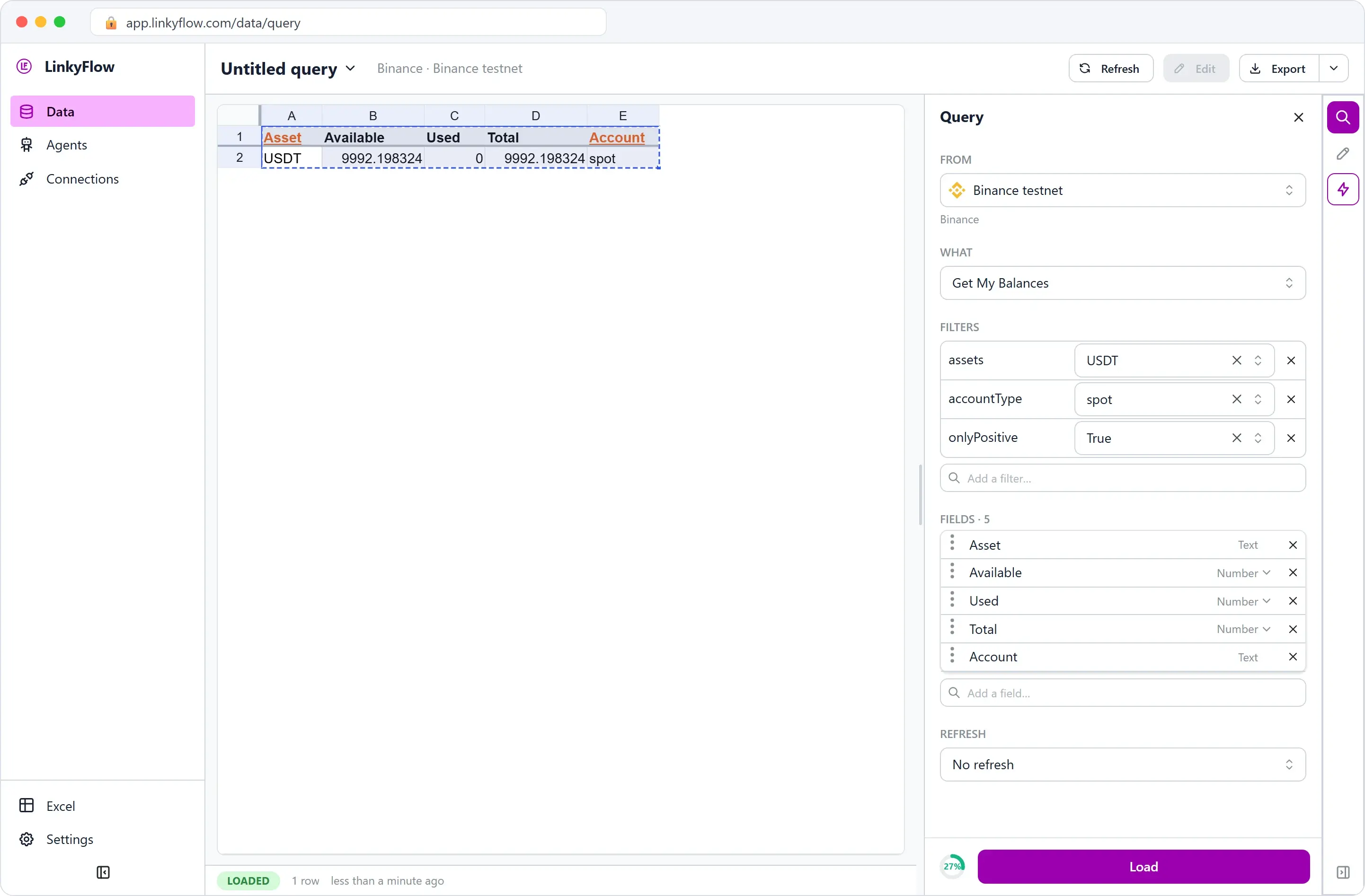
9,992.198324 USDT available, 0 used (held by open orders). The same read for BTC: 1.0001. A testnet account holds hundreds of test assets; the assets filter keeps the one you ask for.
5. Preview, then place
LinkyFlow never places an order from the rows of a sheet: an order is placed one at a time, from a conversation with an assistant connected to LinkyFlow's MCP server, from Buy / Sell in the web app's Actions pane, previewed first as here, or from a button in Excel (below). Here, the MCP server. Asked to "buy 100 USDT of bitcoin on my Binance testnet", an assistant calls two tools; for this walkthrough they were called directly, and their answers are quoted as received.
First, exchange_preview_order: BTC/USDT, buy, market, quoteAmount 100 — the sum to spend in USDT, the bitcoin quantity being the exchange's to work out. Nothing is bought. LinkyFlow checks the symbol, the shape of the order and the market's rules, then has Binance test the order on its test endpoint, which places nothing. The answer:
valid: true
validation.performed: symbol, shape, constraints, venue, balance
estimatedCost: 100
constraints: minQty 0.00001, stepSize 0.00001, tickSize 0.01, minNotional 5
warnings: This is the binance testnet: the order uses test funds and no real money moves.
previewToken: p1.1794664397147.…   expiresAt: 2026-11-14T13:53:17Z
On a real account, the warning reads "This is a PRODUCTION connection: placing this order spends real funds."
Then, exchange_place_order: the same order, with the previewToken and an idempotencyKey. The token ties the placement to the order that was previewed (symbol, side, type, amount, account) for five minutes: another order presented with it is refused. The key makes a retry harmless: sent again with the same key, the order is answered, not bought a second time. Through MCP, LinkyFlow places nothing without both. The answer:
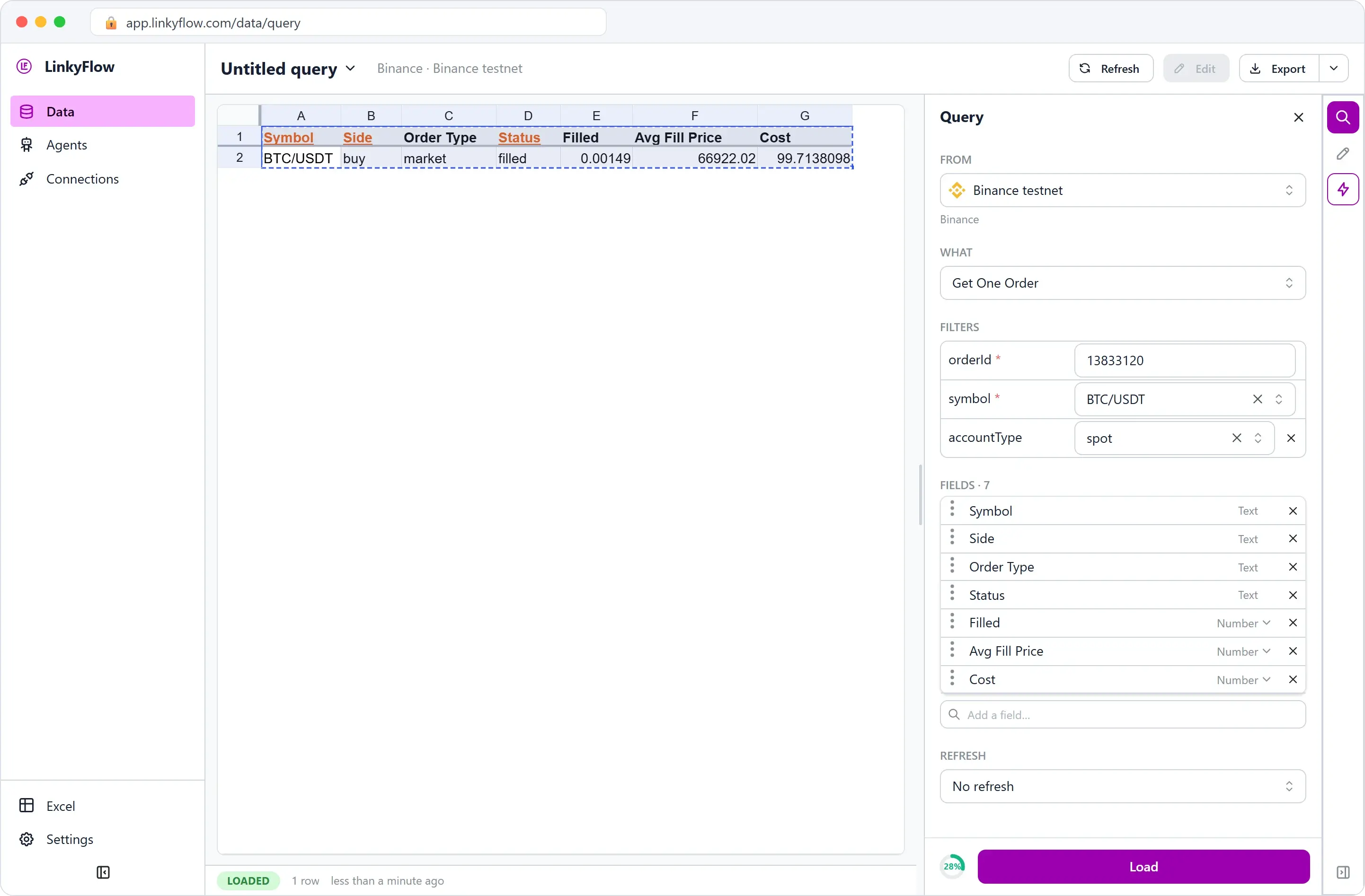
orderId: 13833120
status: filled
symbol: BTC/USDT   side: buy   orderType: market
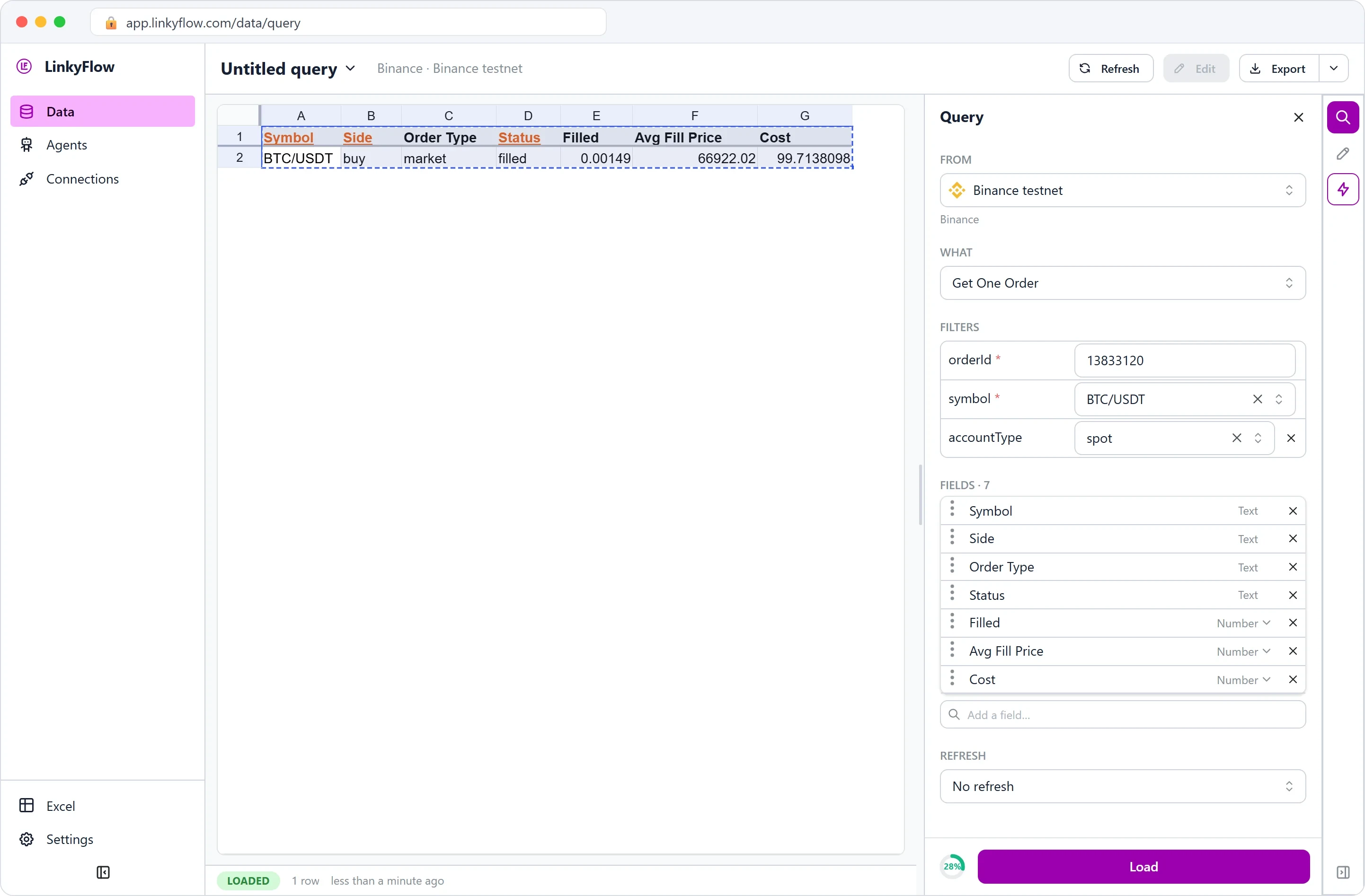
filled: 0.00149   averagePrice: 66922.02   cost: 99.7138098
datetime: 2026-11-14T13:48:16.713Z
Two figures to read twice:
- 99.71 USDT, not 100. A market buy sized in USDT is filled in whole lot steps of 0.00001 BTC: 0.00149 BTC cost 99.71, and 0.00150 would have cost 100.38.
- 66,922.02, not 66,918.03. The book was read half a minute earlier, and a market order takes the price of the moment it arrives. To choose your price, place a limit order: it waits on the book at that price.
6. Check: the order, the trade, the balance
Back in the web app, three reads on the same connection. First Get One Order, with the orderId 13833120 and the symbol BTC/USDT:
Then Get My Trades, BTC/USDT, since 14 November: the fill behind the order.
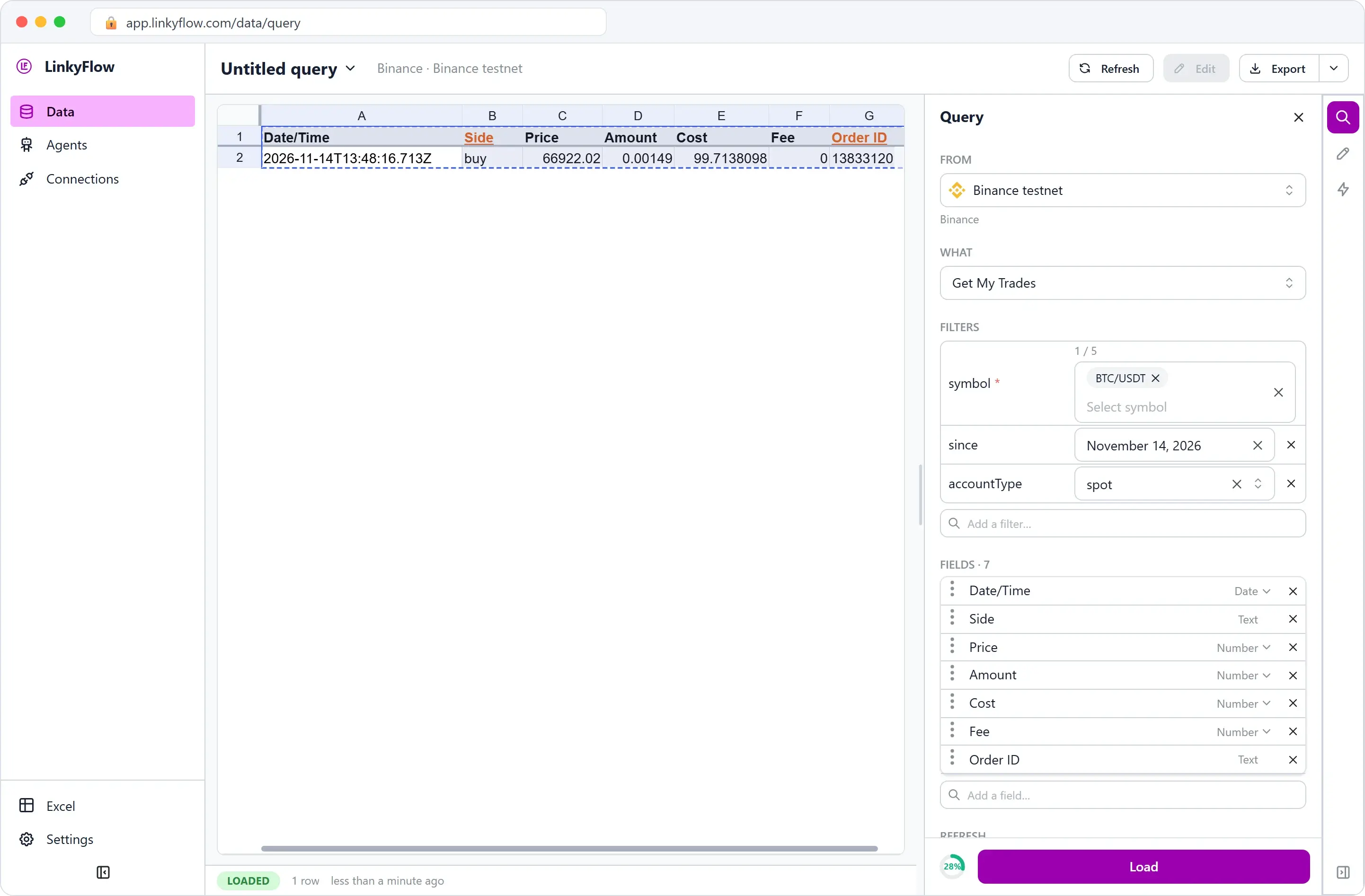
One fill at 13:48:16 UTC for the whole order, its Order ID pointing back to order 13833120. The fee is 0: the testnet charged none on this trade; on a real account, this row is where you read what Binance took, and in which asset.
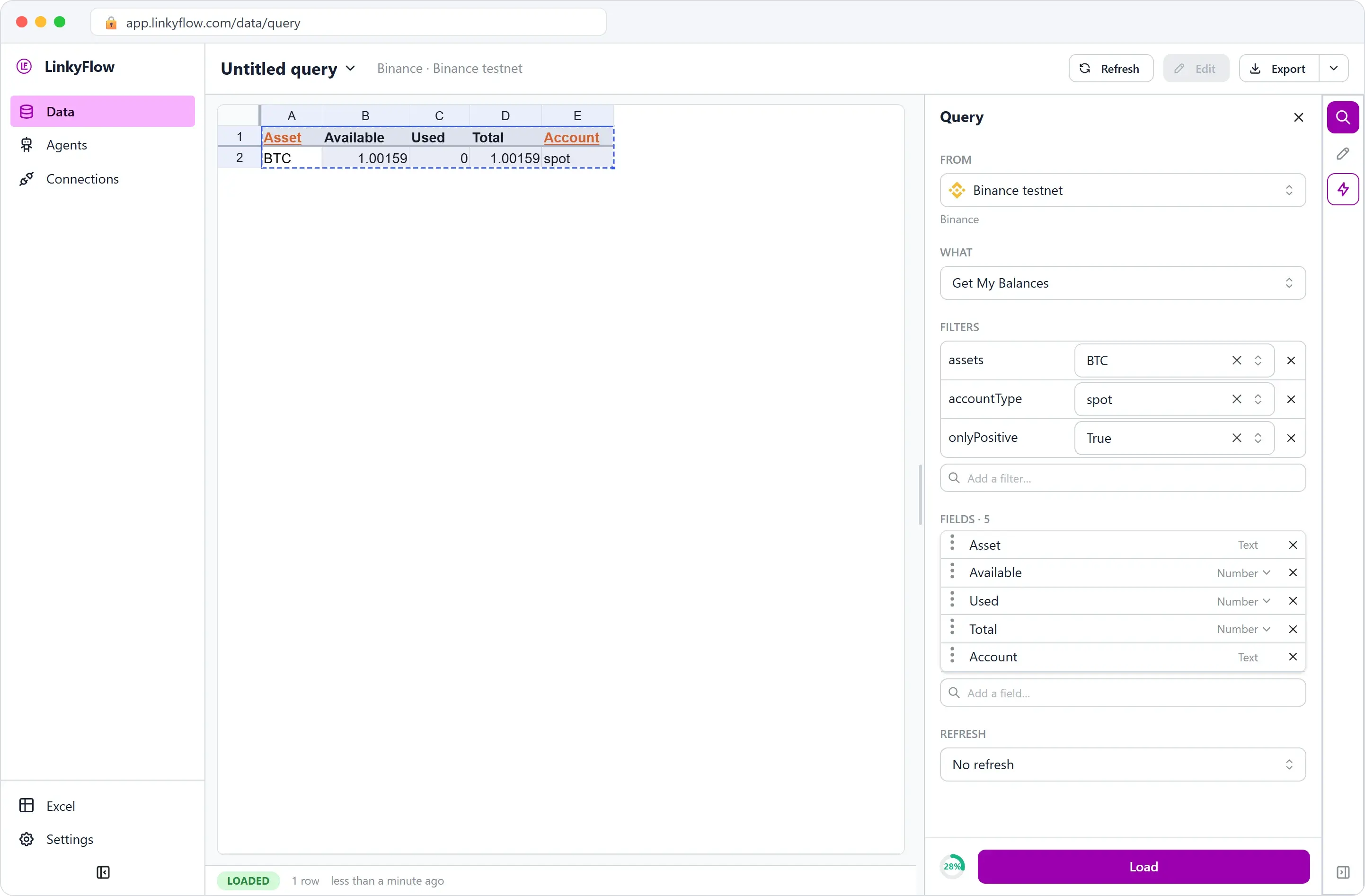
Last, Get My Balances for BTC:
| Asset | Before | After | Change |
|---|---|---|---|
| BTC | 1.0001 | 1.00159 | +0.00149 |
| USDT | 9,992.198324 | 9,892.4845142 | −99.7138098 |
To the last decimal: LinkyFlow carries quantities and amounts as exact decimals, never rounded on the way, so the balance, the order and the fill agree.
A filled order offers no Cancel Order in the web app's Actions pane. An order still resting on the book, such as a limit buy below the market, offers Cancel Order there, from its row.
The same purchase in Excel
Every read above is the same Query panel in the Excel add-in: Load writes the rows into the sheet, Refresh reads them again. For the order itself, the Track one symbol dashboard (LinkyFlow tab, then Dashboard) puts the book, the 24-hour ticker, a price chart, your balances, your orders on the pair and a buy panel on one sheet: choose the side and the order type, type the amount (and the price of a limit order), then click the BUY button. The order opens in the LinkyFlow pane, filled in, and nothing is sent until you execute it there. The steps are in Track one symbol.
On your real Binance account
- A key allowed to trade. A read-only key reads everything in steps 2 to 6 but cannot place an order. Enable Binance's Spot & Margin Trading permission on the key, and never withdrawals: Connect exchange API keys. LinkyFlow reads the key's permissions when you connect it; a key that may not trade still gets a preview, but no token to place it.
- Preview first. Its warning names the environment, and its token is what lets the order through.
- Your assistant. Add LinkyFlow to ChatGPT; any assistant that supports remote MCP servers uses the same address.
Checklist
- A testnet connection to rehearse, a trading key for real.
- The price and the book, read from the connection you will trade on.
- The rules: at least 5 USDT, a quantity in steps of 0.00001 BTC.
- The balance you can spend.
- A preview, then the placement with its token and an idempotency key.
- The order, its fill (price and fee) and the balance, read back.
To follow your balances and trades in Excel over time, read How to display your Binance balances & trades directly in Excel. To compare a symbol's price across exchanges before buying, read Leveraging price discrepancies for arbitrage. Everything LinkyFlow does with exchanges is on LinkyFlow Crypto.