
Shopify and WooCommerce stock in step: one master, exact SKUs, every hour
Choose the store whose stock is the truth — here Shopify — and give LinkyFlow's Inventory Stock Sync agent your WooCommerce store as its target. Every hour it compares each SKU and, depending on the mode you pick, reports the difference, proposes the change, or sets the WooCommerce quantity and reads it back. For WooCommerce's own sales to reach Shopify, add the Omnichannel Sales agent: every 5 minutes it takes each WooCommerce sale off Shopify's stock, once, then has the stock sync push the new quantity. Neither agent matches products by title, touches a price, or reserves stock.
The example below is an illustrative data set, not a run on a real store. The screenshots show the LinkyFlow web app on demo data.
How the two agents share the work
| Inventory Stock Sync | Omnichannel Sales | |
|---|---|---|
| Direction | Shopify → WooCommerce | WooCommerce sales → Shopify |
| What it writes | the WooCommerce stock quantity, set to master − safety stock, never below zero | the Shopify stock, moved by the units each sale took, once per order line |
| When | every hour, the whole catalogue, and on demand | every 5 minutes |
| Safety on the write | read back after every write | Shopify refuses the write if its stock moved since it was read; then read back |
Make Shopify the master. The Omnichannel Sales agent writes to a Shopify master, while a WooCommerce master is only monitored: WooCommerce offers no stock adjustment that is safe against a sale landing at the same moment, so its differences are reported, never written.
Before you start
- Both stores connected. Shopify from the Shopify App Store (Install LinkyFlow for Shopify); WooCommerce with a REST API key (WooCommerce connection setup). A
Readkey is enough to watch; give itRead/Writeonce you want the agent to write. - The same SKUs on both sides. Matching is by exact SKU, spaces trimmed, case kept:
TEE-BLK-Mandtee-blk-mare two SKUs. On WooCommerce, a variable product's stock lives on its variations, each matched by its own SKU, and only items that manage their stock are synced. - One Shopify location. If several of your Shopify locations hold stock, you choose the one the agents read and write; they never add locations up and never pick one for you.
- A plan that runs agents. Starter runs one active agent, Pro runs five: this two-agent setup needs Pro. Both include a 15-day free trial.
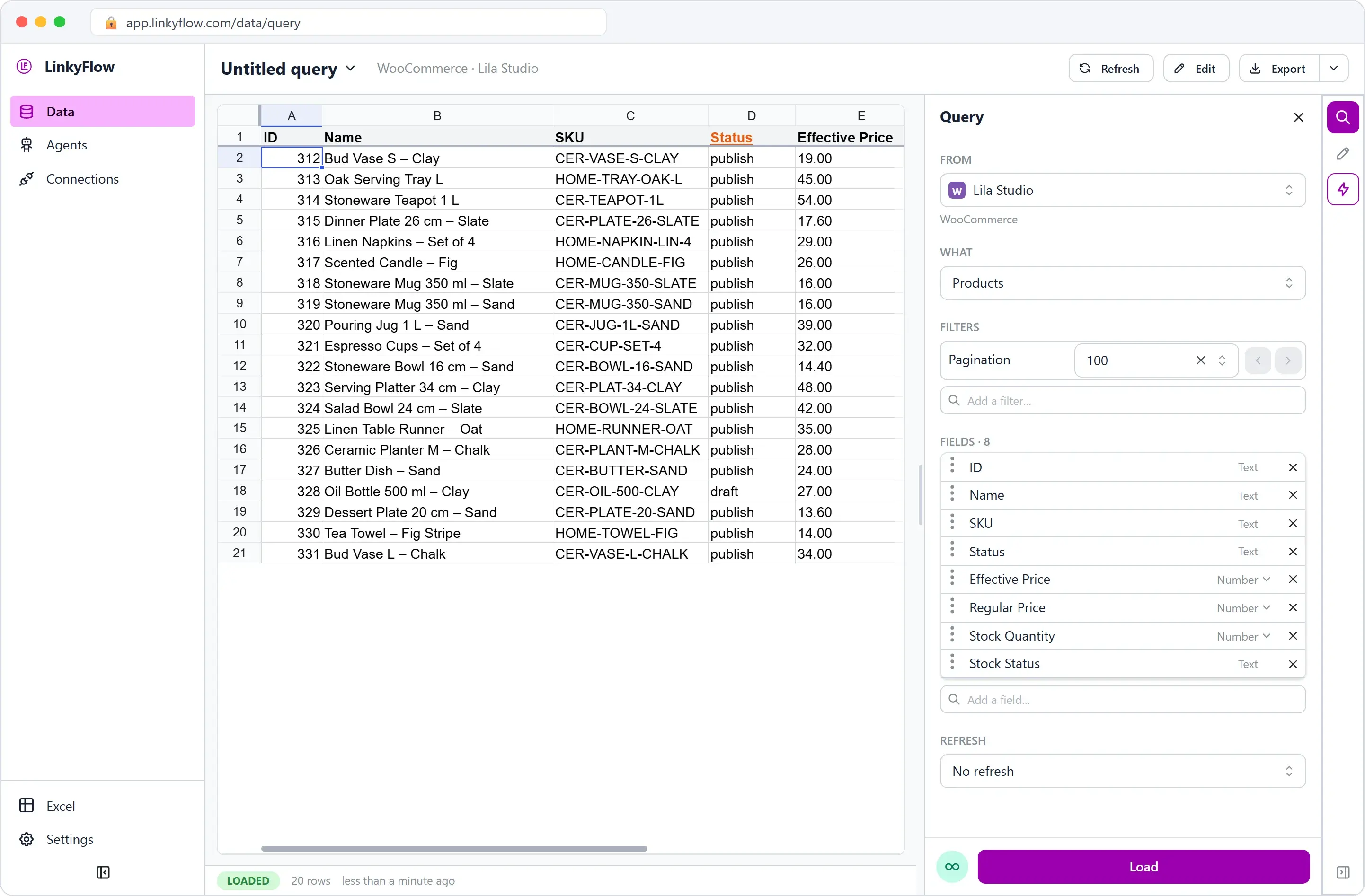
Load both catalogues side by side before you start — Shopify's Product Variant with Sku, WooCommerce's Products with SKU — and the missing or mistyped SKUs show at a glance:
Step 1 — Add the stock sync, in Monitor
In the web app: Agents, Add agent, Inventory Stock Sync.
- Master store: your Shopify store, and its location if it has several.
- Target stores, Add target: your WooCommerce store, with a Safety stock of 2 — two units kept back on WooCommerce per SKU.
- Mode: Monitor. It writes nothing; every agent starts there.
- Name it, add it, then click Run now on its page rather than waiting for the hour.
The first run that sees a target only compares it, whatever the mode: nothing is written to WooCommerce until the agent holds a reading of its own to compare the next one with.
Step 2 — Read what it found
Here is a second run on our illustrative data set, safety stock 2:
| SKU | Shopify (master) | WooCommerce | Wanted | In Monitor | In Auto |
|---|---|---|---|---|---|
| TEE-BLK-M | 24 | 17 | 22 | OUT_OF_SYNC | set to 22, read back 22: UPDATED |
| TEE-BLK-L | 10 | 8 | 8 | SYNCED | nothing to write |
| CAP-NAVY | 0 | 3 | 0 | OUT_OF_SYNC | set to 0, read back: UPDATED |
| SOCK-3P | 40, unchanged | 35 (38 at the last run) | 38 | OUT_OF_SYNC, the drop explained | UPDATE_PROPOSED, never raised on its own |
| MUG-SAND | 12 | no item with this SKU | — | SKU_NOT_FOUND | nothing written |
| tee-wht-s | 15 | only TEE-WHT-S | — | SKU_NOT_FOUND | nothing written |
| BAG-01 | two variants carry it | 6 | — | SKU_AMBIGUOUS | nothing written |
Three rows deserve a word:
- CAP-NAVY: a sold-out master empties the target. That is on by default, because a sold-out product is usually the first thing to replicate; switch it off if your master's zeros cannot be trusted.
- SOCK-3P is the conflict case. WooCommerce dropped by 3 while Shopify did not move: most likely a WooCommerce sale that Shopify has not counted. Raising WooCommerce back to 38 would put up for sale units that may be gone, so the agent never does it on its own — step 4 settles it.
- tee-wht-s and BAG-01: nothing is matched by title or "close enough", and a SKU that names two items is never guessed.
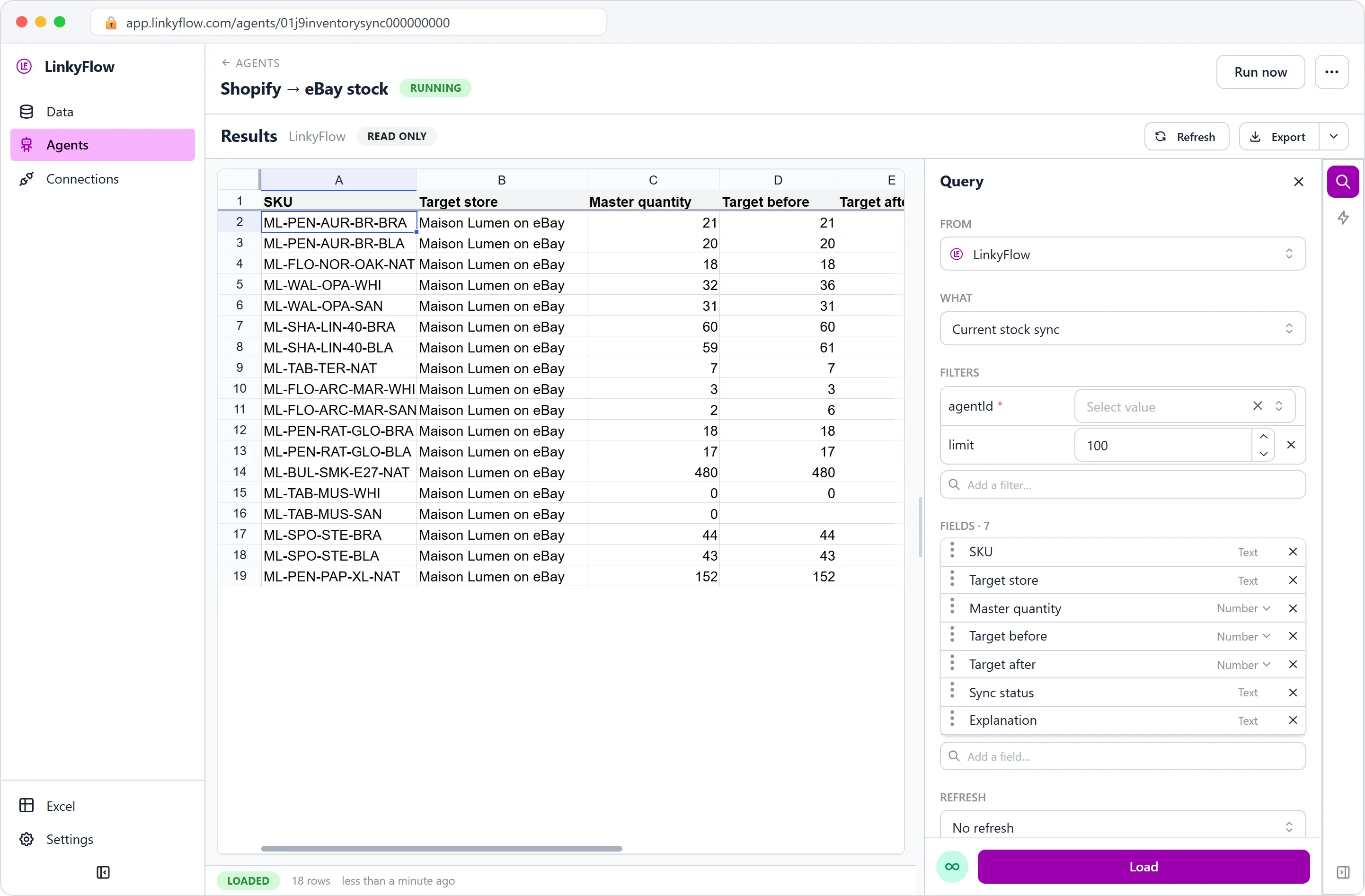
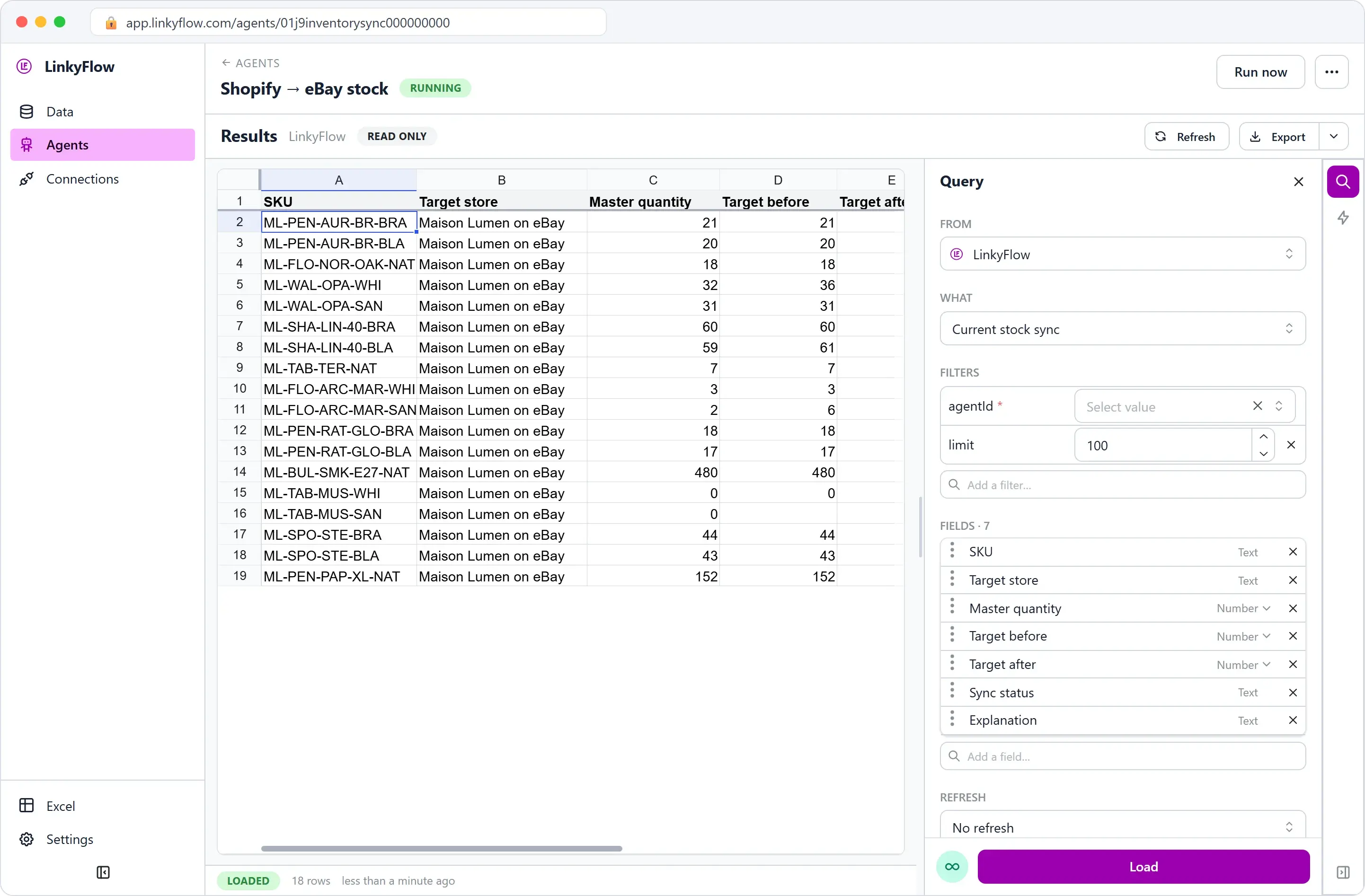
On the agent's page, Results shows these rows. WHAT switches between Current stock sync (one row per SKU and target: master quantity, target before and after, status, explanation), Open exceptions (what needs you), Runs and Historical run detail. Export turns any of them into a connected Excel workbook.
Step 3 — Fix the catalogue, then let it write
- SKU_NOT_FOUND: give the item the same SKU on both stores. For Shopify, a variant sheet does it in bulk: Shopify in Excel: bulk edit products, variants, prices and stock.
- SKU_AMBIGUOUS: give each variant its own SKU.
- NOT_TRACKED: turn on stock management for that item in WooCommerce. The agent never does it for you.
Then choose how it writes:
- Approval: each difference becomes a proposal. On the agent's page, Waiting for your decision lists them, with Approve and Reject for one or a selection; ChatGPT or Claude can decide them too, through LinkyFlow's MCP server. Before writing an approved change, the agent reads both stores again and applies the guard-rails again: if a stock moved, nothing is written and a fresh proposal replaces the old one.
- Auto: the target quantity is set, then read back, and counted as updated only when the quantity read back is the one wanted. The settings say in red that this mode writes.
Before any automatic write, guard-rails refuse what looks like a wrong reading of the master, and each refusal becomes a WRITE_BLOCKED case:
| Guard-rail | Default |
|---|---|
| Max change per SKU | 500 units, or 300 % of the target's current stock |
| Share of the catalogue that may suddenly need a correction | 25 %, beyond which no write goes to that store in the run |
| Age of the master reading | 30 minutes, beyond which it is read again |
| A master at zero may empty a target | on |
Step 4 — Bring WooCommerce's sales back to Shopify
The stock sync replicates; it does not count sales. A WooCommerce sale lowers WooCommerce alone, and SOCK-3P stays a proposal. The Omnichannel Sales agent closes that loop. Agents, Add agent, Omnichannel Sales:
- Master store: the same Shopify store and location.
- Sales channels, Add channel: WooCommerce. To Does the master already record its sales?, answer No — apply its sales, unless an app already imports your WooCommerce orders into Shopify: then Yes — observe only, or every sale would be taken off twice.
- Stock Sync to trigger: the stock sync of step 1.
- Monitor first, then Approval or Auto.
With SOCK-3P: the agent reads the WooCommerce order of 3 units, takes 3 off Shopify (40 → 37), reads Shopify back, then runs the stock sync on SOCK-3P alone. Shopify's 37 minus the safety stock of 2 is 35, exactly what WooCommerce holds: the SKU is back in sync, nothing is written to WooCommerce, and the proposal lifts because the master moved. Shopify's own sales are already on Shopify's stock; the stock sync carries them to WooCommerce at its hourly run.
Orders placed before the agent first read WooCommerce are never applied, and neither are sales watched in Monitor mode once you switch: if Shopify missed some before, correct it there. By default, a movement over 50 units for one SKU waits for you.
How often, and the limits
- Hourly, the whole catalogue, plus Run now whenever you want. Linked to Omnichannel Sales, the stock sync also runs minutes after a WooCommerce sale, on the SKUs it moved. The stock sync has no webhook of its own.
- Every 5 minutes for Omnichannel Sales reading WooCommerce orders; WooCommerce's notifications are not used.
- Up to 100,000 stockable items per connection and run; a larger catalogue is reported as truncated, never half-synced in silence.
- No compare-and-set on WooCommerce. A WooCommerce sale landing between the agent's read and its write is erased from WooCommerce's count until the master moves; the read-back only catches what lands after the write. On a busy store, prefer Approval with a safety stock, or keep Omnichannel Sales running.
- Stock quantities only. Products, prices, titles and orders are never touched, and no stock is reserved: a safety stock is a buffer, not a reservation.
- Run detail is kept 30 days; the run summaries and the current sync stay.
FAQ
Can WooCommerce be the master instead? For the stock sync, yes. For Omnichannel Sales, a WooCommerce master is only monitored, so the two-way setup works with Shopify as the master.
Is it real time? No. Shopify's stock reaches WooCommerce at the hourly run, or when you click Run now; a WooCommerce sale reaches Shopify within the 5-minute cycle of Omnichannel Sales, and WooCommerce minutes later.
Does it work with variable products? Yes, through their variations: each needs its own SKU and its own stock management on WooCommerce.
Can I approve changes from ChatGPT or Claude? Yes. With LinkyFlow connected, ask which SKUs are out of sync and why, then approve or reject the proposals, up to 25 at a time. Each approval is checked against both stores again before anything is written.
Does it sync prices? No, only stock. The Price Sync agent does list prices.
Go further
- Inventory Stock Sync agent: every status, every rule.
- Omnichannel Sales agent: how a sale reaches the master exactly once.
- LinkyFlow for Shopify and LinkyFlow for WooCommerce.
- Add both agents in the web app at app.linkyflow.com, under Agents.