Lila Studio, chapter 3: the new collection
It's the spreadsheet that starts it.
A supplier Léa likes sends over a winter range — twenty pieces: a heavier hoodie, a ribbed beanie, a scarf she's a little in love with. It arrives, as these things always do, as an Excel file. Names in one column, wholesale prices in another, her own retail prices pencilled in beside them.
Twenty products. In the old world, that's twenty trips through the admin's "Add product" screen: type the name, set the price, pick a status, save, start again. An afternoon, easily. And she's been burned by the other route too — exporting a CSV template, reshaping her file to match its columns, feeding it to an importer, and decoding whatever it complained about.
But after the delivery, she has a hunch. If she could edit sixty products in rows… could she create twenty the same way?
From reading to writing a blank page
So far she's loaded existing things. Creating is the mirror image: instead of pulling data down, she asks LinkyFlow for an empty template shaped like a product, fills it, and pushes it up.
She flips the panel into Create mode. The left side now reads Create, and the button she's used all week — Load — becomes Load template.
- Provider →
WooCommerce - Query →
Products - Load template
Up comes a blank grid, the product fields as columns, waiting. For a clothing line, the ones that matter are the obvious ones:
- name — what the customer sees (the only truly required field).
- regular_price — her retail price.
- sale_price — optional, for later.
- sku — her own code.
- status —
publishto go live, ordraftto stage it quietly. - manage_stock + stock_quantity — turn on counting and set the opening number.
- type — leave it blank and it's a
simpleproduct, which is what every piece in this range is.
One row, one product
This is the moment the afternoon collapses into minutes. Her supplier's file is already a table. Names down one column, prices down the next — the exact shape the template wants. She lines them up and fills the rows: the winter hoodie, the ribbed beanie, the scarf, each on its own line, each with a price and an opening stock count.
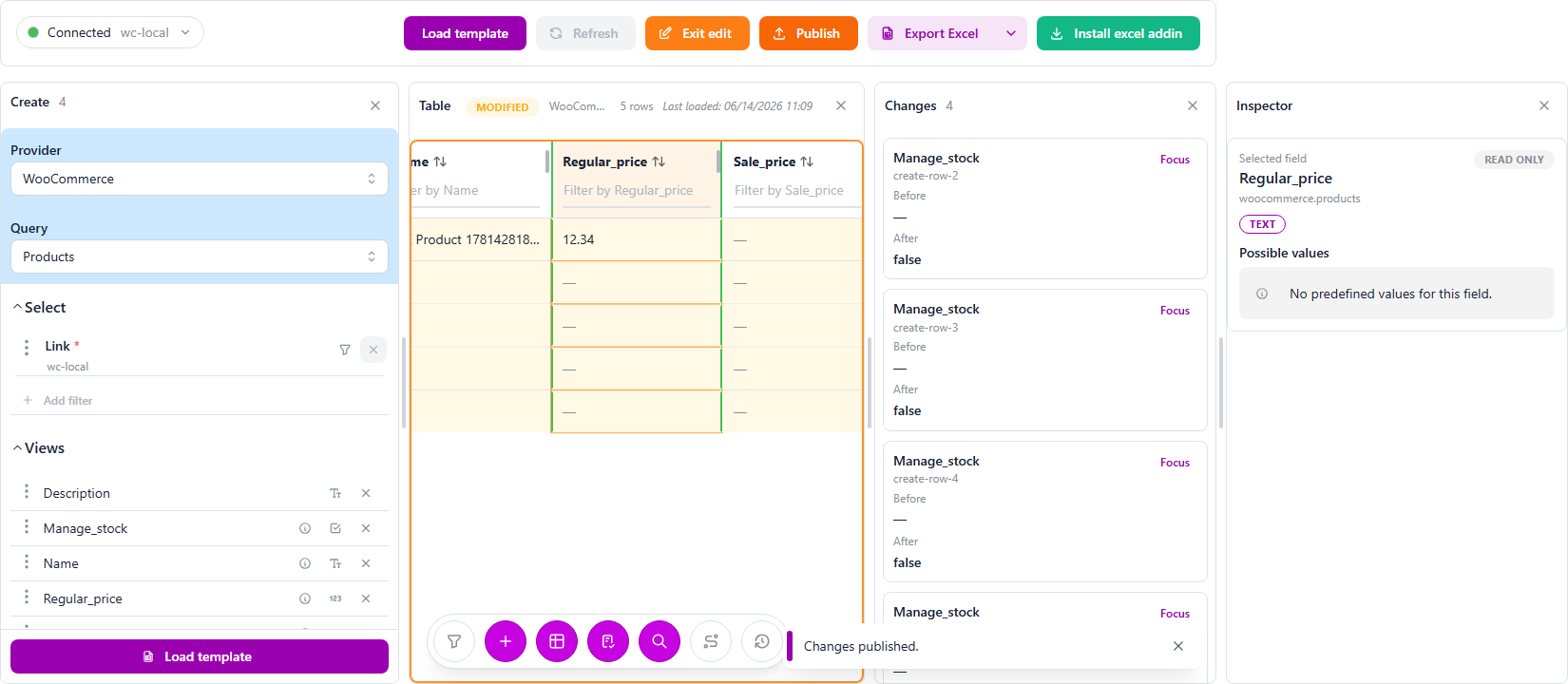
The Changes panel logs every new value as a pending change, and the table badge reads MODIFIED — nothing has left her laptop yet. The Inspector on the right confirms what each field is as she clicks across. She sets the whole range to draft, because she wants to eyeball it before customers do, and because typing a stock_quantity quietly turns stock management on for each one — same trick as the delivery.
Publish, and the collection exists
She clicks Publish. Every filled row becomes a real product in WooCommerce, in one batch, and the new pieces come back into the sheet — now with the IDs WooCommerce just assigned them. The Changes published. toast again.
If she'd left a name blank or fat-fingered a price, the Changes panel would have pointed at that one row and created the rest anyway. She didn't, this time. Twenty products, drafted, in the time it used to take to add three.
Later, when she's happy, flipping them from draft to publish is just another edit — load the range, change the status column, publish. The window-display moment is hers to choose.
The part she'll repeat forever
And here's why this sticks: the source was a spreadsheet, and so was the work. Next season's range will arrive the same way, and Léa won't open the admin at all. She'll paste the supplier's file into the template — maybe build her SKUs with a formula, maybe fan a category down a column — and publish. Paste, publish, collection live.
When the catalog grows up
The same create pattern covers the rest of the catalog as she needs it — each its own query:
- Variations — when a piece comes in several sizes or colours, create them under a parent product.
- Categories, Tags, Brands — set up the shelves she'll sort the new range onto.
- Attributes and their terms — define "Colour" or "Size" once, reuse everywhere.
Léa now reads her shop, fixes her shop, and grows her shop — all from the same table. Which leaves exactly one thing she's never done well: selling hard. The winter range is drafted. Launch weekend is coming. And a launch needs offers.
Useful links
- LinkyFlow for WooCommerce: /products/woocommerce
- Catalog & pricing doc: /docs/woocommerce-catalog-pricing
- Inventory & stock doc: /docs/woocommerce-inventory-stock
- WooCommerce installation guide: /docs/woocommerce-installation